Magical vs TypeFire: Free Chrome Text Expander Comparison
Magical is one of the most-installed Chrome text expanders, popular with sales teams and recruiters thanks to its data-transfer automations and slick onboarding. TypeFire is the newer free option with a Mac app, a Chrome extension, and bring-your-own-key AI tokens.
Both have free tiers. Both expand snippets. But they take very different approaches to pricing, AI, and what happens when your library grows past a casual hobby.

TL;DR
- Magical: Polished freemium. AI is metered. Team and high-volume use require a paid plan. Best-in-class data-transfer between tabs.
- TypeFire: Fully free. AI runs on your own API keys (Claude, OpenAI, Gemini), so the meter is on the provider side and Gemini's free tier covers most personal use. Markdown, side panel, Spotlight launcher, and a free Mac app to pair with.
Pricing
Magical advertises itself as free and that is true for the core expansion. The AI features (rewrite, summarize, generate, etc.) are metered on the free tier, and team sharing, single sign-on, and unlimited AI usage are paid tiers that scale per seat.
TypeFire is free with no paid tier. The reason that works is BYOK: AI tokens like {{ai:rewrite}}, {{ai:summarize}}, and {{ai:translate}} run against your own Claude, OpenAI, or Gemini key. You pay your provider directly (often nothing, given Gemini's free tier and OpenAI's small free credits) instead of paying us to pay them.
Two different bets on the same problem. Magical bets you would rather not deal with API keys. TypeFire bets you would rather not be metered.
AI features
This is the most interesting axis.
Magical's AI is good. Their templates with AI variables are fast and the UI handles short generations well. The metering is the friction. On the free tier you will hit limits if you actually adopt AI as part of your daily writing.
TypeFire's AI tokens are flexible by design. You can mix and match providers per snippet (use Claude for rewrite, Gemini for translation, OpenAI for code), pass selections or clipboard contents in, and chain tokens together. Setup is a one-time paste of an API key. If you have never touched an API key before, expect 5 minutes the first time and zero minutes after that.
Winner: Magical if you want zero-setup AI and do not mind being metered. TypeFire if you want unmetered AI with provider choice.
Snippet management
Both apps let you organize snippets in folders or collections, tag them, and search across the library. The day-to-day editing experience is comparable.
TypeFire's edge: the native Chrome side panel. You can pin your full TypeFire workspace next to whatever tab you are working in, edit snippets without leaving the page, and use the rich-text editor at full size. Magical opens a popup, which works well for quick hits but cramps when you are editing longer templates.
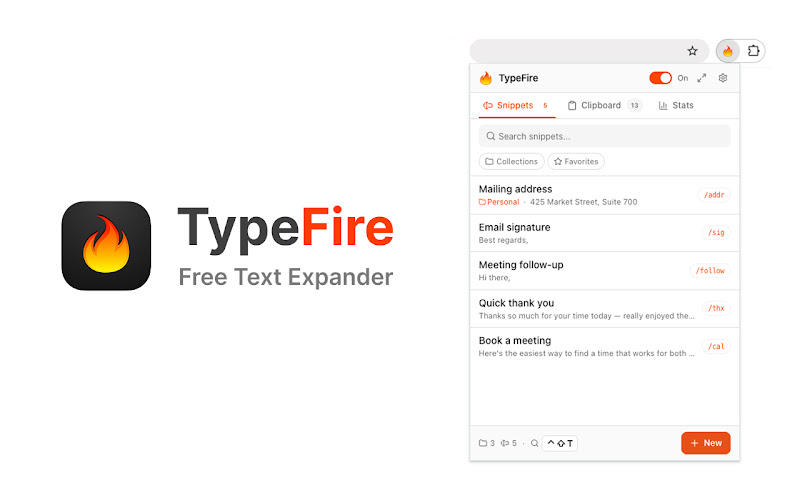
Winner: TypeFire on the side panel. Tie on basics.
Sync and cross-device
Magical syncs through their cloud account. Your snippets live on Magical's servers and follow you to any browser where you sign in.
TypeFire moves a library between machines as a JSON file you own: export in one browser, import in the next. There is also a free TypeFire Mac app, and the snippet library round-trips between Mac and Chrome.
If you only use Chrome on one machine, this difference is invisible. If you switch between Chrome on a work laptop and Chrome on a personal one, Magical's account-based sync is more convenient right now.
Winner: Magical, until TypeFire's extension sync ships.
Supported sites
Both work in most contenteditable fields across the web. Both handle Gmail, Slack web, Linear, Notion, ChatGPT, GitHub, Discord, and similar. Both struggle with Google Docs (Docs renders text on a canvas element that no extension can reliably reach; TypeFire shows a "not supported" notice when you open the popup on Docs).
Magical has invested heavily in form-detection for sales tools like Salesforce, HubSpot, and LinkedIn. If you spend your day moving data between tabs in those tools, Magical's automations are a real win.
Winner: Magical for sales-tool automation. Tie elsewhere.
Data-transfer automations
This is the feature Magical pushes hardest and it is genuinely good. You highlight a field on one tab, drop a variable into a snippet, and Magical pulls the field across tabs at expansion time. For recruiters and salespeople paste-bombing prospect data into outreach tools, it is a real time-saver.
TypeFire does not do this. The closest equivalent is {{clipboard}} plus AI tokens to transform the clipboard contents. It works for many cases but it is not the same product feature.
Winner: Magical, no contest.
The Mac angle
TypeFire has a free Mac app that handles everything the Chrome extension cannot reach: Slack desktop, Apple Mail, Notes, Xcode, Terminal, and any other native macOS app. Same email login, same snippet library via JSON round-trip.
Magical is Chrome-only. If you do most of your work in the browser that is fine, but the moment you move into native macOS apps you are back to typing manually.
Winner: TypeFire, if you are on Mac.
When Magical is the better pick
- You move data between tabs in sales or recruiting tools all day
- You want zero AI setup and the free tier is enough
- You only ever work in the browser
When TypeFire is the better pick
- You want unmetered AI with provider choice
- You like Markdown for snippet formatting
- You are on Mac and want one library across the browser and native apps
- You want a full editor in a side panel, not just a popup
- You want a tool that stays free as your team grows
The verdict
Magical is a great product with a sharp focus on sales and recruiting workflows. TypeFire is the better fit if you want unmetered AI, deep Markdown support, a side panel workspace, and a free Mac companion.
If you are unsure, both extensions are free to try. Install TypeFire from the Chrome Web Store or read our Chrome extension guide for the full feature set.
Loved by people who type all day.
Unprompted reactions from users, in their own words.
Used by people at
Company names are places where our users work. They do not imply endorsement or affiliation.