The Free Text Expander Chrome Extension
Type a short abbreviation, get a full snippet. Works in every text field on every site you visit. AI tokens, dynamic data, rich text, Markdown. Free forever, no subscription, no per-seat fees.
Works on Chrome, Edge, Brave, Arc, Opera · Windows, Mac, Linux, Chromebook
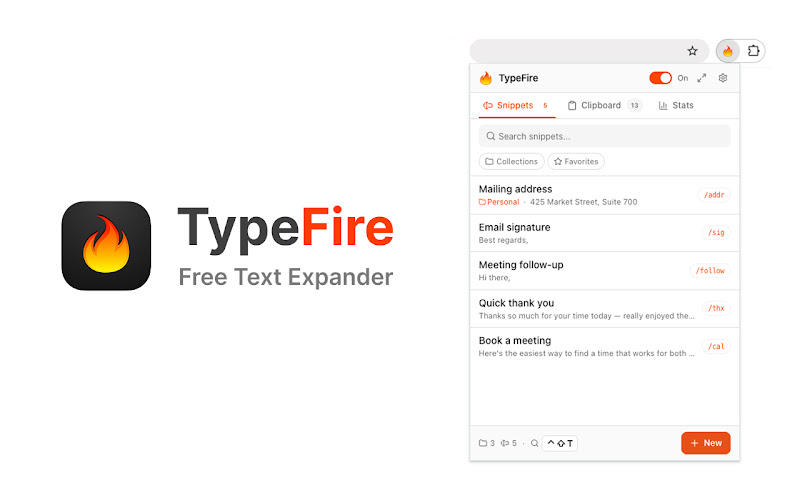
The TypeFire popup. Pin it to your toolbar, search snippets, or maximize into the side panel.
Why TypeFire for Chrome
Browser text expanders are everywhere, but most are paid, slow, or limited to plain text. TypeFire fixes all three.
Works on every site
Email, chat, docs, code platforms, AI assistants, CRMs, social networks. Anywhere you type in your browser, TypeFire expands abbreviations. Same library, every surface.
AI without tab-switching
Drop {{ai:rewrite}} into any snippet. Highlight text, trigger your shortcut, the AI rewrites in place. No copy-paste to ChatGPT, no losing your spot.
Spotlight-style launcher
Press Cmd+Ctrl+T (Mac) or Ctrl+Shift+E (Windows/Linux) from any tab. Fuzzy-search your snippets, pick one, it pastes into the field you were typing in.
Rich text and Markdown
Snippets aren't just plain text. Use the built-in editor for fonts, colors, lists, links. Or write in Markdown for clean source that expands as formatted HTML.
Local-first, no telemetry on browsing
Snippets live in your browser, not on a server. Zero tracking on your web activity. The only data sent home is once-a-day install counts.
Free forever
No subscription, no per-seat fees, no AI token markup. AI uses your own API keys, calls go straight from your browser to the provider you chose.
Find any snippet from any tab
Press Ctrl+Shift+E (or Cmd+Ctrl+T on Mac) in any tab, fuzzy-search your library, hit Enter, and the snippet pastes right where your cursor is. No popup-hunt, no menu dive.
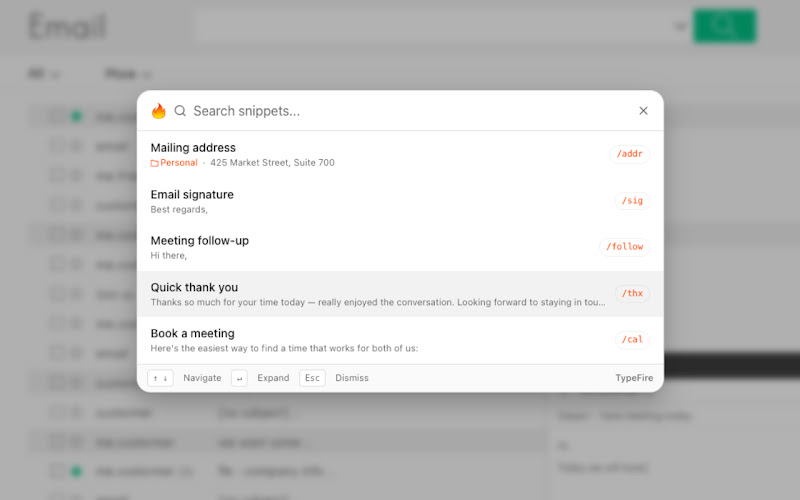
Spotlight launcher running in Gmail. Same UX on any site.
TypeFire vs other Chrome text expanders
Honest comparison. TextExpander has team features TypeFire does not match. Everything else, TypeFire wins or ties at $0.
| Feature | TypeFire | TextExpander | Magical | Briskine |
|---|---|---|---|---|
| Price | Free forever | $40/year | Free + paid AI tier | $5+/mo per user |
| Works everywhere in browser | Yes | Yes | Yes | Gmail-focused |
| AI tokens in snippets | BYOK, 5 providers | Paid Pro tier | Paid tier | Limited AI |
| Rich text + Markdown | Yes | Yes | Yes | Yes |
| Dynamic tokens | Full set | Full set | Limited | Limited |
| Spotlight-style launcher | Yes - Cmd+Ctrl+T | No | No | No |
| Companion native Mac app | Yes - free | Yes - paid | No | No |
| Team collaboration | No | Yes - paid | Yes - paid | Yes - paid |
| Per-seat licensing | No - free for any team size | Yes | Yes for AI tier | Yes |
Pair with the Mac app for full coverage
The extension covers every web app. The Mac app covers every native app on macOS, including Slack desktop, Mail, Notes, Xcode, and Terminal. Same email login, same snippet library via JSON export. Most people install both.
If you are on Windows, Linux, or a Chromebook, the extension is the full solution. The Mac app is macOS only.
Frequently asked questions
Common questions about the TypeFire Chrome extension.
Yes. The TypeFire Chrome extension is free with no paid tier and no subscription. Unlimited snippets, AI tokens with your own API keys, dynamic data, rich text, Markdown, collections, clipboard history, all included at no cost. No subscription required. Compare to TextExpander Chrome at $40/year, Magical at paid AI tier, or Briskine at $5+/month per user.
TypeFire's Chrome extension works on every Chromium-based browser: Chrome, Microsoft Edge, Brave, Arc, Opera, Vivaldi, and any other browser that supports Chrome extensions. Install once from the Chrome Web Store and it works the same in all of them. It also works on every operating system Chromium runs on, which means Windows, macOS, Linux, and Chromebook all get TypeFire support through the extension.
The Mac app runs natively on macOS and works in every Mac application, including non-browser apps like Slack desktop, Mail, Notes, Xcode, and Terminal. The Chrome extension runs inside your browser and works in every web app on every site. Most people install both: the Mac app handles native applications, the extension handles web apps. They share email login and JSON snippet libraries round-trip cleanly between them. The Chrome extension is also the only option on Windows, Linux, and Chromebook since the Mac app is macOS-only.
Yes. The Chrome extension works in every web app with an editable text field. A small number of web apps use specialized editor architectures (canvas-based rendering, custom paste handlers) where the extension shows a 'not supported' notice in the popup. For those edge cases, the TypeFire Mac app handles them natively if you're on macOS.
Yes. Drop AI tokens like {{ai:rewrite}}, {{ai:summarize}}, or {{ai:translate:fr}} into any snippet. Bring your own API key from a supported AI provider. Calls go directly from your browser to the provider you chose; TypeFire never sees prompts, responses, or keys. There's a free tier path using Gemini's free API quota or running local Ollama, so AI usage can be $0.
The extension needs storage (to save your snippet library locally), activeTab and scripting (to detect abbreviations and replace them in the text field you're typing in), clipboardRead and clipboardWrite (for the {{clipboard}} token and the clipboard fallback used in stubborn editors), alarms (for the once-per-day usage telemetry), and host_permissions <all_urls> (because expansion needs to work everywhere you type). The extension only reads characters in editable fields, never the full page content, never your cookies, never your localStorage. Full privacy policy at typefire.app/legal.
Visit the Chrome Web Store listing, click Add to Chrome, confirm the permissions, then sign in with your email. You'll receive a one-time verification code by email. After verification, the extension is ready to use. Pin it to your toolbar for quick access. Setup takes under a minute.
Loved by people who type all day.
Unprompted reactions from users, in their own words.
Used by people at
Company names are places where our users work. They do not imply endorsement or affiliation.