TextExpander Web vs TypeFire Chrome Extension: Which Wins
TextExpander has been the brand-name text expander since the early 2000s. The Chrome extension is the web companion to its long-running desktop product, with serious cross-platform sync and the strongest team admin tooling in the category.
TypeFire's Chrome extension is the newer, fully free alternative. It hits almost all of TextExpander Web's solo-user features without the subscription.

Here is a head-to-head for anyone deciding which one to install in 2026.
Pricing
TextExpander Web is part of the broader TextExpander subscription. The individual plan is around $40 per user per year (often more on the Life plan). Team and Org tiers scale per seat and push higher.
TypeFire's Chrome extension is free with no paid tier. Same library, same features, same login from day one whether you are one person or a hundred.
For a solo user, that is the difference between paying $40 every year for the rest of your text-expanding life and paying nothing.
Cross-platform sync
TextExpander syncs through its own cloud across Mac, Windows, iOS, iPadOS and the Chrome extension: open a snippet on your phone and it is on your laptop a few seconds later. That is a real convenience, and it is what part of the subscription pays for.
TypeFire keeps the library as a file you own. Build it in the extension or the Mac app, export it as JSON, import it on the other side, and the same file round-trips between Mac and Chrome. Nothing sits on a server you do not control, there is no account to keep alive, and the export is also your backup.
What this comes down to: if you want a phone in the loop today, TextExpander has it. If you want your snippets in a file you can read, back up and move anywhere, TypeFire already works that way.
Team features
TextExpander Org plans add shared libraries with admin controls, snippet-level permissions, usage analytics and SSO. For a 50-person sales team that needs to push a new pricing block to every rep at once, that dashboard is what you are buying.
TypeFire shares a library the same way it moves one: as a JSON file. Export the collection, send it, import it. For a small team that is one message and one click, at zero per seat, with no admin console to run and no per-user pricing to reconcile.
What this comes down to: an org-wide rollout with permissions is TextExpander's product. A team that shares a snippet file and pays nothing per seat is TypeFire's.
Snippets and tokens
Both apps cover the core: abbreviations, dynamic tokens (date, time, clipboard), fill-in fields (TextExpander) versus deterministic cursor placement (TypeFire), and rich-text formatting.
TextExpander's fill-in form fields are unique and useful for templates where you need to prompt yourself for variables before sending. TypeFire skips fill-ins in favor of inline tokens that expand instantly without interrupting the flow.
TypeFire's edge: Markdown support. Snippets can include headers, bold, lists, and code blocks using standard Markdown syntax that the extension renders cleanly on insertion. Useful for developers, writers, and anyone using Markdown-aware sites like GitHub, Linear, and Notion.
Winner: TextExpander for fill-in workflows. TypeFire for Markdown.
AI features
Both have AI. TextExpander's AI tools are gated behind their paid plan. TypeFire's AI tokens are free via bring-your-own-key (Claude, OpenAI, or Gemini), and Gemini's free tier covers most personal use at zero cost.
If you write with AI as part of your day, the pricing difference matters. TypeFire is the cheaper path even before you add up the subscription.
Winner: TypeFire on cost. TextExpander only if you specifically want AI without setting up your own API key.
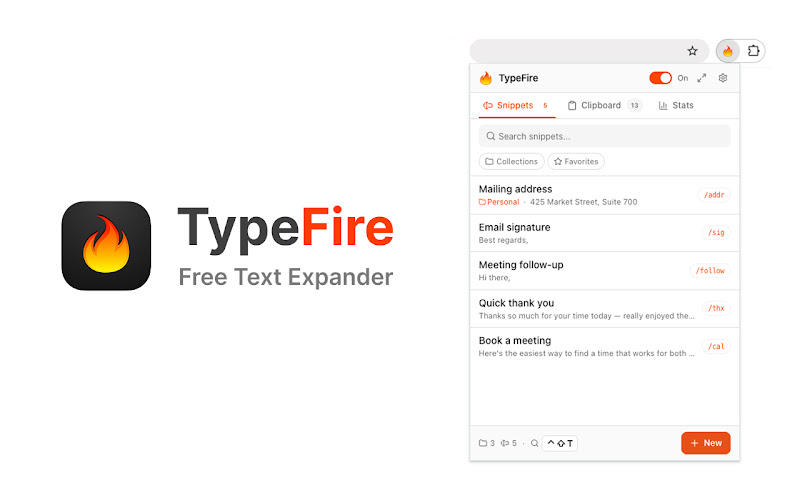
Side panel and Spotlight launcher
TypeFire's Chrome extension uses the native Chrome side panel for a full workspace next to your tab. You can edit longer snippets at full size, browse your library, and never lose your spot in the page you are working on.
The Spotlight launcher (Ctrl+Shift+E on Windows and Linux, Cmd+Ctrl+T on Mac) fuzzy-searches your full library from any page. For people with 50+ snippets, this is the actual unlock: you stop trying to remember abbreviations and start searching.
TextExpander Web has neither of these. It is a popup-only UX.
Winner: TypeFire.
Cross-browser support
Both work in every Chromium browser: Chrome, Edge, Brave, Arc, Opera. Tie.
Mac app
TypeFire has a free Mac app that handles every native macOS app the browser cannot reach: Slack desktop, Apple Mail, Notes, Xcode, Terminal. The snippet library round-trips between Mac and the Chrome extension via JSON.
TextExpander has a Mac app too, also paid, also part of the same subscription. Same cross-platform sync.
For Mac users specifically, both surfaces have a desktop story. The difference is the price tag.
Winner: Tie on coverage. TypeFire on price.
When TextExpander Web is the right call
- Your team is 25+ people and needs shared libraries with admin controls
- You rely on fill-in form fields for complex templates
- You need real-time sync across Mac, Windows, iOS, and the browser today
- Your company already pays for it
When TypeFire is the right call
- You are a solo user or small team
- You want free AI tokens with provider choice
- You want a Markdown-native editor
- You like having a side panel workspace and a Spotlight launcher
- You want a free Mac app to pair with the extension
- You do not want to think about a subscription
Switching to TypeFire
If you already use TextExpander, the migration is straightforward. Export your snippets, import them as JSON or recreate the ones you actually use (most libraries have a long tail nobody touches). Most snippets transfer one-to-one. Fill-in fields need to be reworked into deterministic tokens or AI tokens depending on the use case.
A few hours of cleanup buys you years of no subscription bills.
The bottom line
TextExpander is the mature, enterprise-grade option. If you need real-time cross-device sync and admin controls, it earns the subscription.
For everyone else, TypeFire is the better economic choice. Install it from the Chrome Web Store and see how far the free version takes you. The Chrome extension overview has the full feature list.
Loved by people who type all day.
Unprompted reactions from users, in their own words.
Used by people at
Company names are places where our users work. They do not imply endorsement or affiliation.