TypeFire is now a Chrome extension, free, cross-platform text expansion in your browser
After a few months of beta testing with Mac app users, TypeFire is now available as a free Chrome extension. The extension lives in the Chrome Web Store and works across every Chromium-based browser on Windows, Mac, Linux, and Chromebook.
What's in the extension
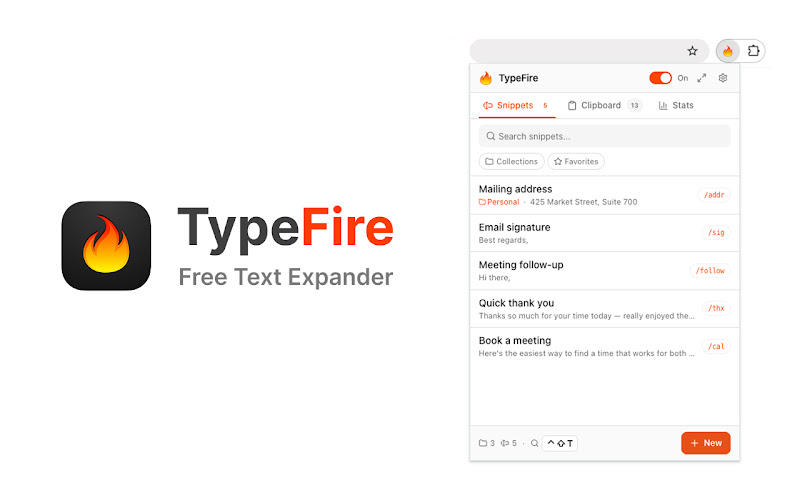

Everything the Mac app does inside a browser, plus a few things tuned for the browser surface specifically.
- Abbreviation expansion in every text field on every site
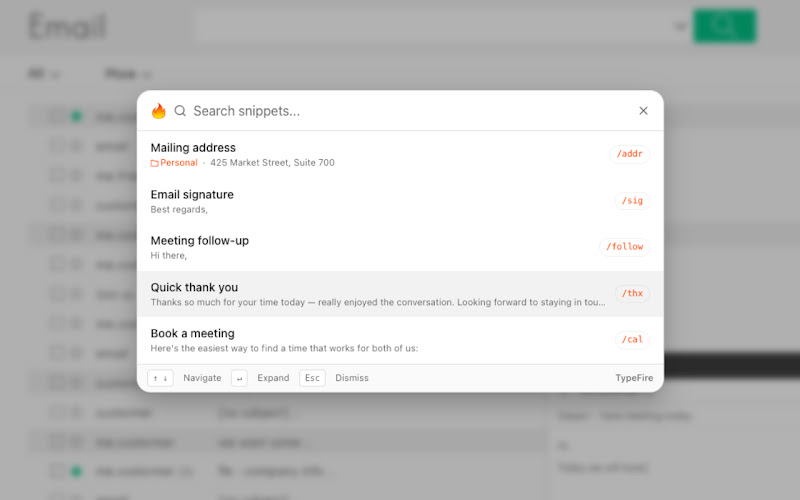
- Spotlight-style fuzzy launcher (Cmd+Ctrl+T on Mac, Ctrl+Shift+E on Windows and Linux)
- Rich text and Markdown snippets via the built-in TipTap editor
- Dynamic tokens: {{date}}, {{time}}, {{clipboard}}, {{cursor}}, {{snippet:abbr}}, and more
- AI tokens: {{ai:rewrite}}, {{ai:summarize}}, {{ai:translate}}, {{ai:fix}}, and custom prompts
- Clipboard history of the last 20 things you copied from web pages
- Side panel mode for a full workspace, or popup mode for quick hits
- Collections, tags, and favorites for organizing larger libraries
- Eight UI languages including English, Spanish, French, Portuguese, German, Italian, Dutch, and Russian
Why a Chrome extension, when there's already a Mac app
Three reasons.
First, the Mac app is macOS-only. Anyone on Windows, Linux, or Chromebook couldn't use TypeFire at all until now. The extension opens TypeFire to those audiences without us needing to build separate native apps for each operating system.
Second, the extension and the Mac app cover different surfaces even on macOS. The Mac app works in every native macOS app: Slack desktop, Mail, Notes, Xcode, Terminal. The Chrome extension works in every web app: Gmail, Slack web, Linear, ChatGPT, GitHub, Discord, anything browser-based. Together they cover everything.
Third, the snippet library round-trips cleanly between the two. JSON export from the Mac app imports into the extension and vice versa. Same email login. So you can install both, build your library once, and have it everywhere.
Pricing model
The extension is free forever. No paid tier, no per-seat licensing, no AI token markup. AI features use your own API keys, so you pay your provider directly (or use a free path like Apple Intelligence on Mac, Gemini's free tier, or local Ollama). The total AI cost can be zero.
Compare to the alternatives:
- TextExpander Chrome extension: $40 per user per year
- Magical: paid AI tier
- Briskine: $5+ per month per user on paid plans
TypeFire is free for any team size, on any operating system, with no subscription.
What it's good for
The browser-based workflows where most modern work happens.
- Sales reps using web-based CRMs like Salesforce, HubSpot, Pipedrive, Outreach
- Customer support agents working in Zendesk, Intercom, Help Scout, Front
- Writers using Substack, Ghost, WordPress, Notion, Medium
- Developers using GitHub, GitLab, Jira, Slack, ChatGPT
- Anyone who types the same email signature, address, or phrase more than a few times a day
What it's not good for
The Chrome extension only works inside Chromium-based browsers. It does not reach native desktop apps. If your day-to-day is mostly Slack desktop, Apple Mail, or Microsoft Office on the desktop, the Mac app handles that side (for macOS users) or you'll want a Windows-native expander like Beeftext to pair with the Chrome extension on Windows.
Google Docs also doesn't work because Docs renders text to a canvas element that browser extensions can't reliably tap into. TypeFire shows a "not supported" notice when you open the popup on a Docs page. Gmail, Google Sheets, Google Slides, and the rest of Google Workspace work fine.
Permissions
The extension needs the standard text-expander permission set: storage for the snippet library, scripting and activeTab to detect abbreviations in editable fields, clipboard read and write for the {{clipboard}} token and clipboard fallback, alarms for the once-per-day usage telemetry, and host_permissions
How to install
Open the Chrome Web Store, search for TypeFire, click Add to Chrome. Or use any other Chromium browser (Edge, Brave, Arc, Opera) and follow the same flow. Sign in with your email, verify the one-time code, start typing abbreviations.
If you already use the Mac app, the extension uses the same email login. Export your snippet library from the Mac app as JSON and import into the extension to get your full library in seconds.
What's next
Your library travels with you today: export it as JSON from one browser and import it in the next, and the same file round-trips with the Mac app.
Outside of the extension, the Mac app is at v1.8.1 with Apple Intelligence support, the Custom AI provider for Ollama and LM Studio, and the polished metrics pipeline. See the Mac app release notes at the Mac landing page for the full feature list.
If you have feedback on the extension, the in-app Feedback button routes directly to our inbox. We're a small team and we read every message.
Free Chrome extension, free Mac app, free forever. Pick your surface and start typing less today.
Loved by people who type all day.
Unprompted reactions from users, in their own words.
Used by people at
Company names are places where our users work. They do not imply endorsement or affiliation.