Briskine Alternative: Free Chrome Text Expander with AI
Briskine is a long-running Chrome text expander with a sharp Gmail focus, popular with recruiters and customer support teams. It is freemium: the free tier covers basic templates, and the paid plans start around $5 per user per month for team sharing and unlimited templates.
TypeFire is the newer fully free alternative. Same core abbreviation expansion, plus a side panel workspace, AI tokens, and a free Mac app companion.

This is the honest head-to-head, including what Briskine does better.
What Briskine does well
Two real wins worth calling out up front.
Gmail integration. Briskine's template UI lives inside Gmail itself in a way that feels native. The template browser dialog, the variables panel, the way fields auto-fill: Gmail-first text expanders feel different from general-purpose ones, and Briskine has the deepest Gmail integration in the category.
Team sharing. Briskine's paid plans handle team libraries cleanly. Permissions, shared folders, and team-level analytics are mature. For a 10 to 50 person support team that needs everyone using the same canned responses, Briskine is a real option.
If those two things are central to your workflow, Briskine earns its price.
Where TypeFire is the better fit
For most other use cases, TypeFire has the edge.
Pricing
Briskine's free tier limits you to a small number of templates and one user. TypeFire is fully free with no template cap, no user cap, no AI cap (you bring your own API key).
For solo users and teams that do not need formal admin tooling, TypeFire's free tier is just enough where Briskine's is not.
AI tokens
Briskine added AI features in 2026, gated behind the paid plans. TypeFire's AI tokens ({{ai:rewrite}}, {{ai:summarize}}, {{ai:translate}}, custom prompts) ship free in the extension via bring-your-own-key. Claude, OpenAI, or Gemini. Gemini's free tier covers most personal use at zero cost.
Site coverage
Briskine works across many sites but is optimized for Gmail. TypeFire is general-purpose: Gmail, Slack web, Linear, Notion, ChatGPT, GitHub, Discord, Salesforce, HubSpot, Zendesk, every other contenteditable field.
If your day is 80% Gmail, this difference does not matter. If you bounce across web apps, TypeFire is the broader tool.
Editor experience
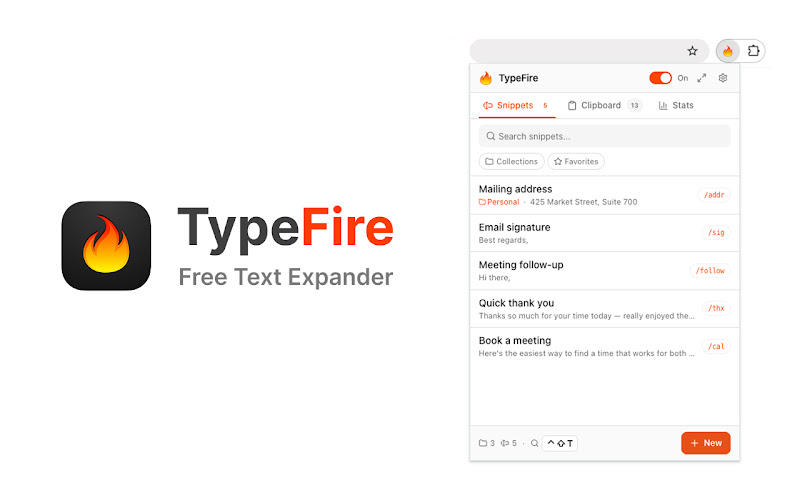
TypeFire ships a TipTap-based rich-text and Markdown editor in the extension popup and the native Chrome side panel. You can edit longer snippets at full size and use Markdown syntax that renders cleanly on insertion.
Briskine's editor is solid but popup-only and less Markdown-aware.
Surfaces
TypeFire has a native Chrome side panel: pin your full workspace next to the tab you are working in. It also ships the Spotlight launcher (Ctrl+Shift+E on Windows and Linux, Cmd+Ctrl+T on Mac) for fuzzy-searching the full library from any page.
Briskine has neither.
Mac app
TypeFire has a free Mac app for everything the browser cannot reach: Slack desktop, Apple Mail, Notes, Xcode, Terminal. Briskine is Chrome-only.
Feature comparison
| Feature | TypeFire | Briskine |
|---|---|---|
| Price | Free | Free tier, paid from ~$5/user/mo |
| Template cap (free) | Unlimited | Limited |
| AI tokens | Free (BYOK) | Paid |
| Rich text and Markdown | Yes | Rich text |
| Side panel | Yes | No |
| Spotlight launcher | Yes | No |
| Gmail integration depth | Strong | Strongest |
| Team admin features | No | Yes (paid) |
| Mac app companion | Yes (free) | No |
Migrating from Briskine to TypeFire
If you decide to switch, here is the lift.
Export your templates. Briskine has a built-in export to JSON or CSV in the settings. Pull the file.
Decide what to keep. Most libraries have a long tail of templates nobody uses. Skim the export and pick the 20% you actually send. This is the migration's biggest time-saver.
Recreate in TypeFire. Open the side panel, paste each template into a new snippet, set the abbreviation. Most templates port one-to-one. Briskine's variables map to TypeFire's {{cursor}} for placement and {{clipboard}} for paste-in data. Free-form text fields become {{ai:rewrite}} if you want the AI to clean up rough drafts before sending.
Set up signatures and nested snippets. TypeFire lets you nest snippets with {{snippet:abbr}}. Build your signature once and reference it across every email template, the same way you would in Briskine.
A typical 30-template Briskine library is about 45 minutes of migration work. After that you stop paying.
When to stay on Briskine
If any of these are true, Briskine is the right call:
- You manage a team of 10+ people sharing a single canned-response library with admin controls
- Your workflow is essentially "Gmail and nothing else"
- You specifically want Briskine's Gmail-side template browser
For everyone else, TypeFire's free tier covers the same ground with more flexibility.
Get started with TypeFire
Install from the Chrome Web Store, sign in with your email, and load up a few templates to test. The Chrome extension overview has the full feature list and shortcuts.
If you want a broader landscape view, the best Chrome text expander roundup for 2026 covers Magical, TextExpander Web, and Auto Text Expander too.
Loved by people who type all day.
Unprompted reactions from users, in their own words.
Used by people at
Company names are places where our users work. They do not imply endorsement or affiliation.