Step Up From Auto Text Expander
Auto Text Expander does the basics well. If you want rich text, Markdown, AI tokens, dynamic data, and a Spotlight-style launcher, TypeFire is the natural next step. Same $0 cost, modern feature set.
What TypeFire adds over Auto Text Expander
Auto Text Expander handles basic abbreviation expansion well. Here is what TypeFire adds without changing the $0 price tag.
Rich text and Markdown
Auto Text Expander is plain text only. TypeFire adds rich text via TipTap (fonts, colors, lists, links, images) and Markdown source that expands as formatted HTML.
AI tokens
Drop {{ai:rewrite}}, {{ai:summarize}}, or {{ai:translate}} into any snippet. Five provider options including free Apple Intelligence (macOS 26+), Gemini free tier, and local Ollama.
Dynamic tokens
{{date}}, {{time}}, {{datetime}} with format strings, {{clipboard}} for current clipboard, {{cursor}} for caret positioning, {{snippet:abbr}} for nested templates.
Spotlight-style launcher
Cmd+Ctrl+T opens a fuzzy search modal. Type a few letters, pick a snippet, paste. Useful when you don't remember the abbreviation but remember the snippet name.
Side panel + popup modes
Quick popup for fast hits, or maximize into Chrome's native side panel for a full workspace when editing rich-text snippets. TypeFire remembers your preferred surface.
Free companion Mac app
If you're on a Mac, the native app handles non-browser apps (Slack desktop, Mail, Notes, Xcode, Terminal). Same email login, JSON-portable library between the two.
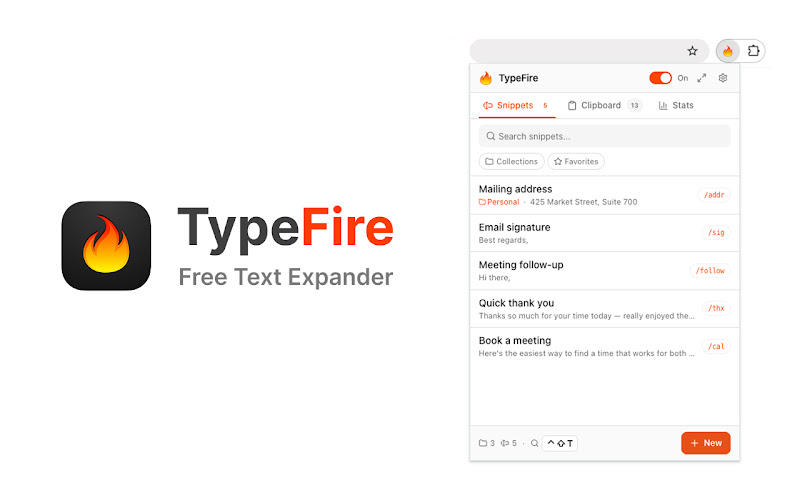
TypeFire's Chrome popup. A real editor and library, not just an options page.
TypeFire vs Auto Text Expander
Both free. Auto Text Expander focuses on the basics. TypeFire adds the modern feature set without changing the price.
| Feature | TypeFire | Auto Text Expander |
|---|---|---|
| Price | Free | Free |
| Basic abbreviation expansion | Yes | Yes |
| Rich text | Yes | No |
| Markdown source expansion | Yes | No |
| AI tokens | Yes - 5 providers | No |
| Dynamic tokens ({{date}}, {{clipboard}}, etc.) | Yes - full set | Limited |
| Spotlight-style launcher | Yes | No |
| Clipboard history | Yes - last 20 items | No |
| Side panel mode | Yes | No |
| Collections and tags | Nested + tags | Flat list |
| Free Mac app companion | Yes | No |
| Multi-language UI | 8 languages | English only |
| Snippet import format | JSON, CSV, .textexpander | JSON |
Frequently asked questions
Different goals. Auto Text Expander is minimalist and free, which is great for users who just want basic abbreviation expansion with nothing extra. TypeFire is also free but adds rich text, Markdown, AI tokens, dynamic data ({{date}}, {{clipboard}}, etc.), a Spotlight-style launcher, clipboard history, and a side panel mode. If you outgrew Auto Text Expander, TypeFire is the natural next step at the same price ($0).
Auto Text Expander exports snippets as a JSON file. TypeFire's importer accepts JSON. Export from Auto Text Expander, import into TypeFire, your library is ready in under a minute. For library sizes over a hundred snippets, this is the fastest migration path of any text expander we've tested.
Yes. The app is free. AI uses your own API keys, so you pay your AI provider directly. There's a free-tier path using Gemini's free API quota or local Ollama, so AI usage can also be $0. For paid providers like Claude or OpenAI, a typical rewrite or summarize request costs between $0.001 and $0.01. TypeFire never marks up AI usage.
Rich text and Markdown expansion. AI tokens ({{ai:rewrite}}, {{ai:summarize}}, etc.). Dynamic tokens ({{date}}, {{time}}, {{clipboard}}, {{cursor}}). A Spotlight-style fuzzy launcher (Cmd+Ctrl+T) for searching snippets by name. Side panel mode. Clipboard history. Collections, tags, favorites. Multi-language UI in 8 languages. A free companion Mac app for native macOS coverage. All at the same $0 cost.
Yes. Both extensions work in any text field in any web app. TypeFire works on Chrome, Edge, Brave, Arc, Opera, and any Chromium-based browser, on Windows, macOS, Linux, and Chromebook.
Loved by people who type all day.
Unprompted reactions from users, in their own words.
Used by people at
Company names are places where our users work. They do not imply endorsement or affiliation.