A Free Alternative to Text Blaze for Chrome
Text Blaze has a polished free tier, but most snippet limits, team features, and AI usage live behind paid plans. TypeFire is a free Chrome extension and free native Mac app with no Pro tier. Bring your own AI key, expand dynamic tokens, keep your data local.
Why people switch from Text Blaze to TypeFire
Text Blaze is a strong product with a polished dashboard. These are the moments people start looking for a Pro-tier-free alternative.
No Pro tier paywall
Text Blaze's free tier is generous up to a point. Larger snippet counts, team workspaces, and AI usage push you into Pro ($4 to $15+ per user per month). TypeFire has no Pro tier. Every feature on every page is free, for any number of snippets.
BYOK AI with no rate limits on us
Text Blaze's AI is bundled and rate-limited based on plan. TypeFire AI tokens connect to your own provider key. Requests go straight from your browser to the AI provider. We never see the request, never count it against a quota, never mark it up.
True Mac app, not browser-only
Text Blaze is a Chrome extension. TypeFire ships a native macOS app that expands in every desktop app (Mail, Notes, Slack desktop, Xcode, terminals) plus the free Chrome extension. One snippet library, two surfaces, JSON export round-trips between them.
Snippets stay local
Text Blaze syncs through their cloud by default. TypeFire's Chrome extension stores snippets in your browser. Optional sync goes through your own iCloud Drive via the Mac app, as plain Markdown files protected by your iCloud account. No required server account for snippet storage.
Open JSON export and import
Your snippet library is yours. TypeFire exports the full library to JSON and round-trips it back into the Mac app or the Chrome extension. No vendor lock-in, no proprietary export format, no Pro tier paywall on exporting your own data.
No team-tier upsell for solo users
Text Blaze's Pro and Business tiers are aimed at teams. As a solo user you still see the upsell flow whenever you brush against a limit. TypeFire has no team tier and no upsell. Free is the only plan.
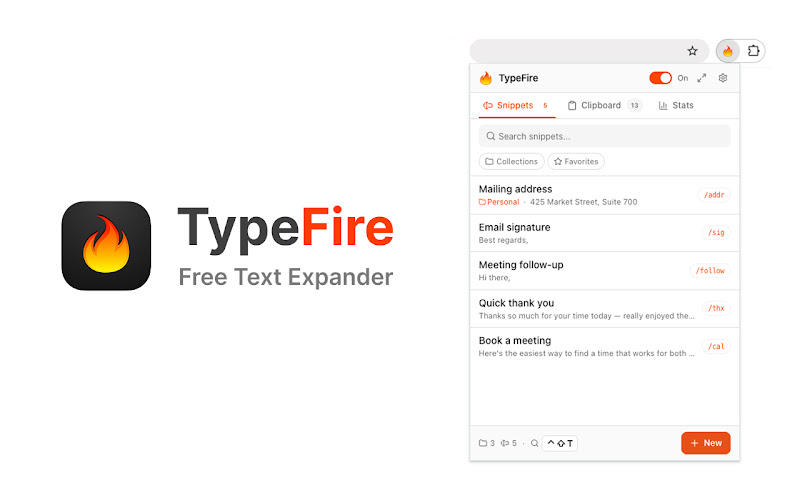
The TypeFire popup. Pin it to your toolbar, search snippets, or maximize into the side panel.
TypeFire vs Text Blaze
Honest side-by-side. Text Blaze wins on team workspace polish and form-filling automation. TypeFire wins on price, AI flexibility, and a real Mac app companion.
| Feature | TypeFire | Text Blaze |
|---|---|---|
| Price | Free forever | Free tier + Pro from $4/mo per user |
| Native Mac app | Yes - free | No - browser only |
| Chrome extension | Yes - free | Yes |
| AI tokens in snippets | Free with BYOK | Paid plan with rate limits |
| Bring your own AI key | Yes - direct to provider | No - relayed through their servers |
| Cloud sync required | No - local-first | Yes - account required |
| JSON export and import | Yes - full library | Limited |
| Dynamic tokens (date, clipboard, cursor) | Full set | Full set |
| Rich text + Markdown | Yes - both | Rich text |
| Spotlight-style launcher | Yes - Cmd+Ctrl+T | No |
| Side panel | Yes | No |
| Team-shared snippet library | Via shared folder sync | Built-in (paid tier) |
Where Text Blaze still wins
Text Blaze has been around for a long time and the product reflects it. The dashboard is genuinely polished, the form-filling automation with dynamic placeholders covers complex use cases like multi-field intake forms and structured data entry, and the team workspace on the Business tier delivers governance and shared-library features TypeFire does not currently match.
If your daily workflow is form-heavy data entry across structured business apps, or you run a 20+ person team that needs centralized snippet permissions and audit logs, Text Blaze Pro or Business is a legitimate fit. TypeFire is for solo users and small teams who want the core text expansion plus AI experience without a per-seat subscription.
One library, two surfaces
TypeFire ships as a free Chrome extension and a free native macOS app. The same snippet library round-trips between them through JSON export and import, so your /sig, /addr, and AI tokens work the same whether you're typing in a browser tab, a native desktop app, or the system-wide Spotlight-style launcher.
Frequently asked questions
Common questions from people switching from Text Blaze to TypeFire.
Yes. TypeFire's Chrome extension and Mac app are both 100% free with no Pro tier. Text Blaze has a free tier for basic snippets but moves higher snippet counts, AI usage, and team workspaces behind paid plans starting around $4 per user per month. TypeFire includes AI tokens at $0 because you bring your own API key, and there's no per-seat licensing for any team size.
Both apps include AI features. Text Blaze's AI is bundled into Pro with a monthly per-user fee and rate limits we don't control. TypeFire AI is free at the app level because you connect your own API key from Apple Intelligence, Claude, OpenAI, Gemini, or local Ollama. Requests go directly from your browser to the provider you choose. We never see them, never count them against a quota, never mark them up.
Text Blaze has a more polished form-filling automation framework with dynamic placeholders for complex multi-field workflows, and the Business tier delivers centralized team governance with permissions and audit logs. If your job is daily form-heavy data entry across structured business apps, or you run a 20+ person team that needs snippet governance, Text Blaze Pro or Business may justify the cost. For solo users and small teams who want core text expansion plus AI, TypeFire matches the experience at $0.
There is no one-click importer. The practical migration is to copy each snippet's content and trigger from the Text Blaze dashboard into TypeFire. For libraries under thirty snippets this takes about twenty minutes. TypeFire's importer also accepts CSV, so if you export your Text Blaze library to a spreadsheet first that path also works for larger libraries.
Yes. TypeFire's Chrome extension works on every Chromium-based browser including Chrome, Edge, Brave, Arc, Opera, and Vivaldi. Text Blaze supports the same browsers via their Chrome extension. Both work cross-platform on Windows, macOS, Linux, and Chromebook. TypeFire additionally ships a free native Mac app for desktop expansion.
Yes. The text expander is free and uncapped, with no subscription. Pro is $18 once and covers six separate features: unlimited clipboard clips, Selection Prompts, Prompt Chains, notes sync, note version history and saving from AI apps through MCP.
Also available as a Chrome extension
TypeFire also runs as a free Chrome extension that works in every web app on every site. Use it alongside the Mac app for full coverage, or as the only TypeFire surface if you live in your browser.
Loved by people who type all day.
Unprompted reactions from users, in their own words.
Used by people at
Company names are places where our users work. They do not imply endorsement or affiliation.