Free Alternative to Briskine for Canned Replies
Briskine works inside Gmail. TypeFire is a free Chrome text expander that works in every email client, help desk, CRM, and chat tool. Same canned-reply workflow, no $5+/month subscription, no per-seat pricing.
Why people switch from Briskine to TypeFire
Briskine is solid for Gmail-heavy workflows. These are the moments people look for something more universal.
Works beyond Gmail
Briskine's deepest integration is Gmail. TypeFire works the same way in Gmail, Outlook, Front, Zendesk, Intercom, HubSpot, Slack, LinkedIn DMs, and every other text field on the web.
Free for any team size
Briskine charges per user on paid plans. A 10-person support team faces material monthly fees. TypeFire is free for any number of agents.
Broader AI provider support
TypeFire works with Apple Intelligence (free, on-device), Claude, OpenAI, Gemini, and local Ollama. You bring your own keys. Briskine's AI is bundled into their paid plan with one provider.
Same canned-reply patterns
Templates for FAQ replies, escalation templates, refund confirmations, follow-up sequences. TypeFire covers every support-team pattern Briskine handles.
Dynamic data and AI tone shifts
Drop {{date}}, {{clipboard}}, {{ai:custom:make this more empathetic}}, or {{ai:translate:es}} into any template. Adjust tone per customer at expansion time without rewriting the template.
Companion native Mac app for full coverage
Free Mac app handles native desktop apps like Slack desktop, Mail.app, and Notes. Use both surfaces with one snippet library that round-trips via JSON.
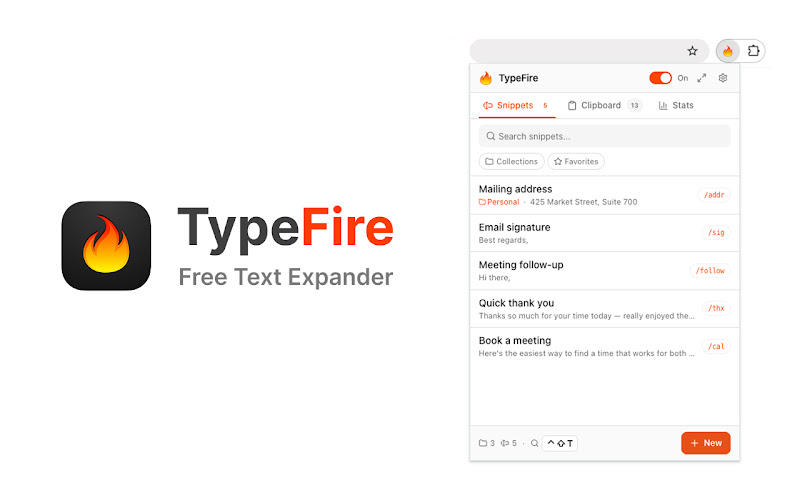
The TypeFire popup in Chrome. Pin it, search snippets, or maximize into the side panel.
TypeFire vs Briskine
Honest side-by-side. Briskine wins on built-in team workspace and Gmail-native polish. TypeFire wins on price and universal site coverage.
| Feature | TypeFire | Briskine |
|---|---|---|
| Price | Free forever | Free tier + paid plans from $5/mo |
| Per-seat licensing | No | Yes on paid plans |
| Works in Gmail | Yes | Yes - native integration |
| Works in other email clients | Yes - all | Limited |
| Works in help desks (Zendesk, Intercom, Front) | Yes - all | Limited |
| Works in CRMs (Salesforce, HubSpot) | Yes - all | Limited |
| AI tokens in templates | Free with BYOK, 5 providers | Paid plan, one provider |
| Rich text + Markdown | Yes | Yes |
| Dynamic tokens | Full set | Variables only |
| Team-shared template library | Via shared folder sync | Built-in team workspace |
| Native Mac app companion | Yes - free | No |
Frequently asked questions
Common questions from people switching from Briskine to TypeFire.
Yes. Briskine starts free for solo users but moves team features, integrations, and higher snippet limits behind a paid plan ($5+/month per user). TypeFire's text expander is free with unlimited snippets, AI tokens via your own API keys, dynamic data, and no per-seat pricing. Same canned-reply workflow at $0 forever.
Briskine is built for Gmail specifically with deep integration into the Gmail compose window. TypeFire works in Gmail but also works in every other text field on every site (LinkedIn DMs, Slack, Notion, CRMs, custom support tools). If your job is 100% Gmail canned replies, Briskine's Gmail-native UI is more polished. If you write replies across multiple tools throughout the day, TypeFire's universal coverage saves the friction of switching tools.
There is no built-in team workspace like Briskine has. The practical workaround is to sync your snippet vault folder through Dropbox, Google Drive, or git. Each team member points their TypeFire vault at the shared folder for canonical company templates and keeps personal snippets in a separate location. Less polished than Briskine's team features but free for any team size.
Yes, and TypeFire's AI integration is broader. Drop {{ai:rewrite}}, {{ai:summarize}}, {{ai:translate:fr}}, or {{ai:custom:make this more empathetic}} into any snippet. Works with five AI providers including Apple Intelligence (free, on-device), Gemini free tier, local Ollama, Claude, and OpenAI. Briskine's AI features are bundled into their paid plan with one provider.
Yes. TypeFire works in every help desk on macOS or any Chromium browser, including Zendesk, Intercom, Help Scout, Front, Freshdesk, HubSpot Service Hub, and any other support tool with a text input. There is no per-tool setup. Type your abbreviation, the canned reply appears in the field.
Loved by people who type all day.
Unprompted reactions from users, in their own words.
Used by people at
Company names are places where our users work. They do not imply endorsement or affiliation.