AI that rewrites text
in any Mac app
Pro, $18 once. Runs on Apple Intelligence or a local model, so it can stay on your Mac.
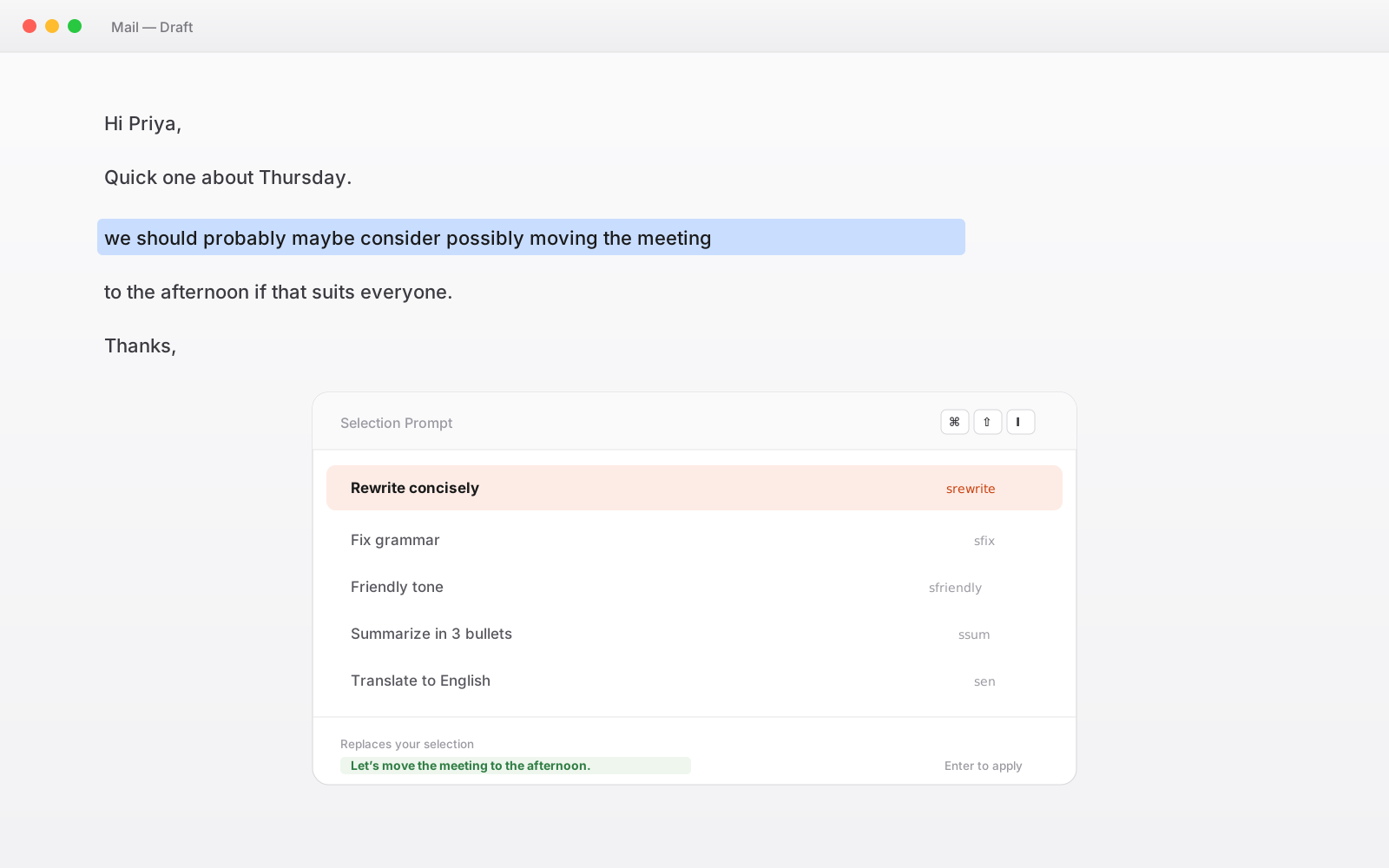
What it actually looks like
One sentence, one shortcut, one prompt.
we should probably maybe consider possibly moving the meeting
Let's move the meeting.
Your prompt library, on a shortcut
Ships with eight prompts ready to use. They are ordinary snippets, so you can edit them, delete them, or write your own.
Rewrite concisely
srewrite
Fix grammar
sfix
Translate to English
sen
Explain code
sexplain
Summarize in 3 bullets
ssum
Formal tone
sformal
Friendly tone
sfriendly
Convert to bullet list
sbullets
Writing your own takes one line. Create a snippet containing your instruction and a {{selection}} token, drop it in the Selection Prompts collection, and it appears in the overlay.
Several passes, one hotkey
A chain runs prompts in sequence, feeding each step the previous step's output. Useful when one pass is not enough and you always run the same three.
- 01
Fix grammar
First pass cleans up the mechanics without touching the meaning.
- 02
Rewrite concisely
Second pass receives the corrected text and tightens it.
- 03
Friendly tone
Third pass takes the tightened version and adjusts the register. One hotkey ran all three.
Three chains ship ready to use: cpolish, ctransbullets, and cexplain. Inside a chain, {{prev}} is the previous step's output and {{selection}} stays the original input throughout, so your existing Selection Prompts drop into chains without editing.
Worth knowing: every step is a separate model call. A three-step chain takes roughly three times as long as a single prompt and, on a metered provider, costs three times as much. Apple Intelligence and Ollama are free per call, which makes them a good fit for chains.
Your model, your key, no markup
TypeFire operates no server in this path. Calls go from your Mac straight to whichever provider you configure.
Apple Intelligence, fully on-device
Free, no API key, and nothing leaves your Mac. Requires macOS 26 Tahoe on Apple Silicon. The best option if the text you are rewriting is sensitive.
Ollama or LM Studio, also local
Point the custom endpoint at a local model and everything runs offline and unmetered. Good for chains specifically, since there is no per-call cost to multiply.
Claude, OpenAI, or Gemini
Bring your own API key and pay the provider directly at their rates. Note that in this case the selected text does go to that provider: TypeFire is not in the path, but the provider is, and that is worth stating.
Any OpenAI-compatible endpoint
A custom base URL covers self-hosted gateways and anything else that speaks the same API.
Eighteen dollars. Once.
TypeFire Pro is a single payment that unlocks unlimited clips, Selection Prompts, Prompt Chains, notes sync, note version history and saving from AI apps through MCP. There is no subscription and no per-seat pricing.
Free tier, then one payment
No free tier at all
One time
No free tier
One time
Lifetime, or $3.99/mo
Five snippets free, then a subscription
Selection Prompts and Prompt Chains are two of the three things Pro unlocks. The third is unlimited clips.
AI transform questions
Still not answered?
Highlight the text wherever it is, in Mail, Slack, Notes, a browser, an IDE, anywhere, and trigger the prompt by its abbreviation or its own shortcut.
The result replaces the selectioe you want, press Enter, and the result replaces your selection in place. There is no copying into a chat window and no pasting back.
TypeFire ships with eight prompts ready to use, including rewrite concisely, fix grammar, translate, summarize, and tone adjustments, and you can edit any of them or write your own.
That depends entirely on which provider you configure, and it is worth being precise about.
If you use Apple Intelligence, which needs macOS 26 on Apple Silicon, everything runs on your Mac and nothing leaves it. The same is true for a local model through Ollama or LM Studio.
If you choose Claude, OpenAI, or Gemini instead, the selected text does go to that provider, using your own API key, and that is unavoidable given how those models work. TypeFire itself operates no server in that path and never sees your text either way, but we would rather say plainly that a hosted provider receives it than claim the feature is always on-device.
AI tokens live inside a snippet: you write a snippet containing something like an AI rewrite token, and when the snippet expands, that part is generated.
They are free and have been in TypeFire since v2. Selection Prompts work the other way round: they act on text that already exists and that you have highlighted, replacing it with the result.
That is the Pro feature. In short, tokens generate text as you produce it; Selection Prompts edit text you have already written.
A chain runs several prompts in sequence on one hotkey, feeding each step the output of the one before.
The built-in Polish chain runs fix grammar, then rewrite concisely, then friendly tone, so a rough sentence comes out corrected, tightened, and in the right register from a single keystroke. Inside a chain, a prev token holds the previous step's output and a selection token stays the original input for the whole run, which means ordinary Selection Prompts drop into chains without being rewritten. Three chains ship ready to use and you can build your own.
Yes, proportionally, and it is worth planning for.
Every step in a chain is a separate model call, so a three-step chain takes roughly three times as long as a single prompt and, on a metered provider like Claude or OpenAI, costs about three times as much in tokens. Apple Intelligence and local models through Ollama are free per call, which makes them the natural fit for chains specifically. Chains show step-by-step progress while they run and can be canceled mid-run.
No. Selection Prompts and Prompt Chains are two of the three things TypeFire Pro unlocks, at $18 once.
The third is unlimited clips. Everything else stays free: the whole text expander, AI tokens inside snippets, AI actions on clips, screenshot OCR, Quick Paste, and Markdown Quick Look.
There is also a 7 day Pro trial that starts automatically on install with no card, and when it ends the prompts gray out with a Pro badge rather than being deleted.
Yes, and it takes one line. Create an ordinary snippet whose body is your instruction plus a selection token where the highlighted text should go, then put it in the Selection Prompts collection.
It appears in the overlay immediately. Because they are ordinary snippets, they can live in collections, carry tags, have their own abbreviation, get a dedicated hotkey, and sync to your other Macs through iCloud like anything else in your library.
It works anywhere macOS exposes your selection, which covers native apps like Mail, Notes, Xcode, and Slack's desktop client, and most web and Electron apps through the clipboard fallback.
A small number of apps sandbox text input aggressively enough that replacing a selection in place is not possible; in those the result is copied to your clipboard instead so you can paste it yourself. If you hit one, telling us which app is genuinely useful.
Loved by people who type all day.
Unprompted reactions from users, in their own words.
Used by people at
Company names are places where our users work. They do not imply endorsement or affiliation.