The Free Text Expander Chrome Extension
Most Chrome text expanders cost $40 to $60 per year. TypeFire is free forever with the same features plus AI tokens, Markdown, and a Spotlight-style launcher. No subscription, no per-seat fees, no AI markup.
What Chrome text expanders actually cost
Most browser text expanders are paid or freemium. Here is the price tag on the major ones, and how TypeFire compares.
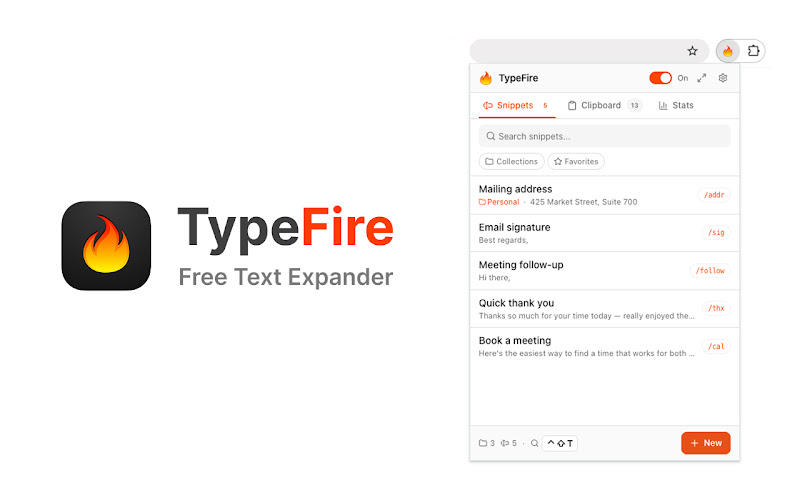
The TypeFire popup. Pin to your toolbar, search snippets, or maximize into the side panel.
What you get for $0
Every feature is included. There is no premium tier holding any of this back.
Abbreviation expansion everywhere
Type a trigger like "zem" in any text field on any site. TypeFire replaces it with your full snippet inline. Works in email, chat, docs, code editors in the browser, AI assistants, CRMs.
AI tokens
Drop {{ai:rewrite}}, {{ai:summarize}}, or {{ai:translate}} into any snippet. Five provider options including free Apple Intelligence (on-device on macOS 26+), Gemini free tier, and local Ollama.
Spotlight-style launcher
Press Cmd+Ctrl+T (Mac) or Ctrl+Shift+E (Windows/Linux) to open a fuzzy search. Type a few letters, pick a snippet, paste. Useful for snippets you don't memorize abbreviations for.
Rich text and Markdown
Snippets can be plain text, formatted rich text via the built-in TipTap editor, or Markdown source that expands as HTML. Use whichever fits the target editor.
Side panel mode
Quick popup for fast hits, or maximize into Chrome's native side panel for a full workspace when writing or editing rich-text snippets. TypeFire remembers your preferred surface.
Active development
Regular updates with new features, bug fixes, and Chrome compatibility. Not abandoned shareware.
Spotlight launcher, any tab
Press Ctrl+Shift+E (or Cmd+Ctrl+T on Mac), fuzzy-search the full library, hit Enter, the snippet pastes where your cursor is.
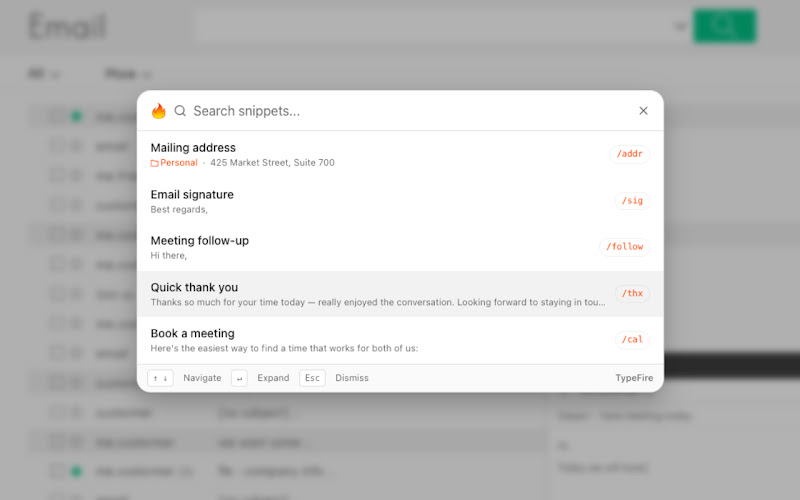
Spotlight launcher inside Gmail. Same UX on any site.
The fine print
Snippets stay in your browser
Snippets are stored in chrome.storage.local on your device. They never leave your browser unless you explicitly export them. No cloud backend storing your data.
No ads, no upsells, no growth team
The popup has no advertising surface, no "upgrade for more" buttons, no growth-team-driven prompts. The free version is the full version.
Minimal anonymous telemetry
TypeFire reports a verified email plus daily aggregate counts (snippets, expansions) once per 24 hours to count active users. No snippet content, no URLs, no page contents, no clipboard data.
No future paywall
Built to stay free. If funding ever becomes necessary, it would be optional donations or business sponsorships, not gating existing features. Existing users are never charged retroactively.
Frequently asked questions
Yes. The Chrome extension is free with no paid tier, no feature gates, and no subscription. Unlimited snippets, AI tokens with your own API keys, dynamic data, rich text, Markdown, clipboard history, all included at no cost.
The app is free. AI features use your own API keys, so you pay your AI provider directly (and TypeFire never marks up usage). There's a free-tier path using Gemini's free API quota or local Ollama, so AI usage can also be $0. Snippet storage is local in your browser, so no per-snippet or per-device fees.
TextExpander Chrome costs $40/year per user. Magical bundles AI into a paid tier. Briskine paid plans start at $5/month per user. TypeFire is free forever with feature parity on the core text expansion workflow and BYOK AI tokens that paid competitors charge extra for.
TypeFire runs at near-zero cost because there is no cloud backend for snippet storage. Snippets stay in your browser. AI features use your own API keys. The only server cost is once-a-day email-keyed usage telemetry, which is minimal. Keeping it free removes the friction of pricing and lets the app focus on being useful rather than monetizable.
Yes. The text expander is free and uncapped, with no subscription. Pro is $18 once and covers six separate features: unlimited clipboard clips, Selection Prompts, Prompt Chains, notes sync, note version history, and saving from AI apps through MCP. Every one of them is new, so nothing that was free ever moved behind the paywall.
Loved by people who type all day.
Unprompted reactions from users, in their own words.
Used by people at
Company names are places where our users work. They do not imply endorsement or affiliation.