A Free Alternative to Magical Text Expander
Magical's basic text expansion is free, but the AI features and team workflows live behind a paid plan. TypeFire is a free Chrome extension with AI tokens, dynamic data, rich text, and Markdown all included. Bring your own API key, pay no subscription.
Why people switch from Magical to TypeFire
Magical is a solid product. These are the moments people start looking for a free alternative.
AI features locked behind paid tier
Magical's AI features (rewrite, summarize, generate replies) require their paid subscription. TypeFire ships AI tokens for free because you connect your own API key. App cost stays $0.
Per-seat pricing scales with team size
Magical charges per user on team plans. A 10-person team faces material monthly fees. TypeFire is free for any number of users with no per-seat licensing.
No markup on AI usage
Magical's paid plan bundles AI usage. TypeFire's AI tokens connect to your own provider key, so you pay only what the AI provider charges directly. No middleman markup.
Five AI provider options
TypeFire works with Apple Intelligence (free, on-device on macOS 26+), Claude, OpenAI, Gemini, or any OpenAI-compatible endpoint like local Ollama. Magical bundles one provider into their paid plan.
Faster setup, no signup walls
Install the extension, verify your email with a one-time code, start typing abbreviations. No 'book a demo' upsell, no sales touch, no credit card required.
Works the same on every site
Both apps work in browser text fields. TypeFire's expansion is purely keystroke-based, so it behaves identically across every web app. No per-site behavior variation.
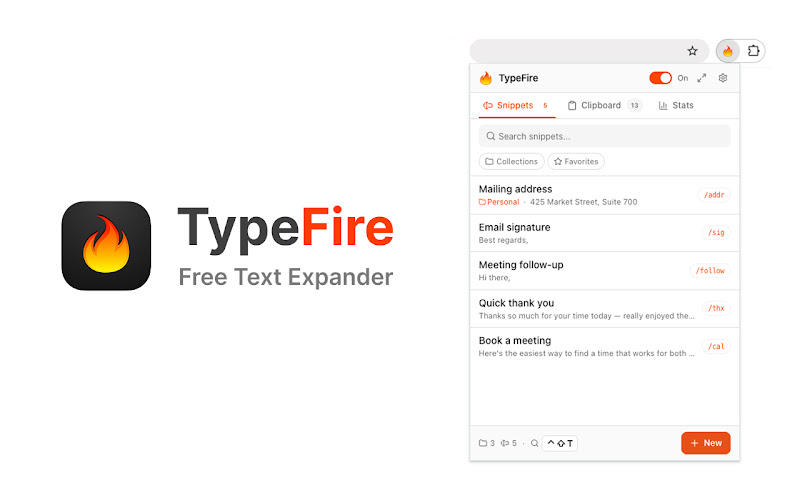
The TypeFire popup. Pin it to your toolbar, search snippets, or maximize into the side panel.
TypeFire vs Magical
Honest side-by-side. Magical wins on CRM automation and built-in team workspace. TypeFire wins on price, AI flexibility, and feature depth.
| Feature | TypeFire | Magical |
|---|---|---|
| Basic text expansion | Free | Free |
| AI tokens in snippets | Free with BYOK | Paid plan |
| AI provider options | 5 providers (Apple Intelligence, Claude, OpenAI, Gemini, Ollama) | Bundled provider |
| Per-user pricing | Free for any team size | Paid per-seat for team features |
| Markdown expansion | Yes - expands as HTML | Limited |
| Dynamic tokens | Full set | Limited set |
| Spotlight-style launcher | Yes - Cmd+Ctrl+T | No |
| Native Mac app companion | Yes - free | No |
| CRM data autofill automation | No | Yes - core feature |
| Team-shared snippet library | Via shared folder sync | Built-in team workspace |
Frequently asked questions
Common questions from people switching from Magical to TypeFire.
Yes. TypeFire's Chrome extension is free with no paid tier. Magical has a free tier for basic snippet expansion but moves AI features and team workflows behind a paid plan. TypeFire includes AI tokens at $0 because you bring your own API key, and the app itself never charges. For solo or small-team text expansion workflows, TypeFire delivers the same experience without the subscription.
Both apps include AI features. Magical's AI is bundled into their paid plan with a monthly per-user fee. TypeFire AI is free at the app level because you connect your own API key from a supported provider. There's a free-tier path using Gemini's free API quota or local Ollama, so the total AI cost can be $0. For heavier paid usage with Claude or OpenAI, you pay the provider directly (a few cents per dozen requests) and TypeFire never marks it up.
Honest answer: Magical has dedicated workflows for sales-specific use cases like CRM data autofill via their browser-based automation. If your job is daily Salesforce data entry across thousands of records, Magical's automation framework may justify its cost. TypeFire is a general-purpose text expander that works in every text field on every site, but it does not auto-populate CRM fields from a database the way Magical's automation engine does.
There is no automatic importer because Magical does not export to a standard format. The practical migration: open Magical, copy each snippet's content and trigger, create the matching snippet in TypeFire. For libraries under thirty snippets this takes about twenty minutes. TypeFire's import does accept CSV from text expanders that export to CSV, so if you have a way to extract your library to CSV first that path also works.
Yes. TypeFire works in every text field on every site, including Salesforce, HubSpot, Pipedrive, Outreach, Gmail, LinkedIn, Slack web, Notion, Discord, and any other web app with an editable input. There is no per-site setup or integration. Type your abbreviation, the expansion appears in the field you're focused on.
Yes. The text expander is free and uncapped, with no subscription. Pro is $18 once and covers six separate features: unlimited clipboard clips, Selection Prompts, Prompt Chains, notes sync, note version history and saving from AI apps through MCP.
Loved by people who type all day.
Unprompted reactions from users, in their own words.
Used by people at
Company names are places where our users work. They do not imply endorsement or affiliation.