A Free Alternative to Compose AI for Chrome and Mac
Compose AI is an AI writing assistant in Chrome. TypeFire gives you the same AI tokens plus a full text expander (abbreviations, dynamic tokens, rich text, Markdown) and a free native Mac app. Bring your own API key, requests go straight to the provider, no Premium tier.
Why people switch from Compose AI to TypeFire
Compose AI is a polished AI writing assistant. These are the moments people want AI tokens plus a real snippet library, without a monthly subscription.
BYOK AI with no monthly cap
Compose AI's free tier is rate-limited and Premium unlocks more. TypeFire AI tokens connect to your own provider key. Requests go straight from your browser to the AI provider. We never see them, never count them, never throttle them.
Text expander plus AI, not just AI
Compose AI focuses on AI writing suggestions. TypeFire is a full text expander: abbreviation triggers, dynamic tokens (date, clipboard, cursor), rich text editor, Markdown source files, plus AI rewrite, summarize, translate, and custom prompts on top.
No Premium tier upsell
Compose AI has a free tier and a paid Premium tier with higher limits and extra features. TypeFire has no Premium tier. Every feature on every page is free for any number of snippets, any number of AI calls, any team size.
Mac app plus Chrome extension
Compose AI is browser-only. TypeFire ships a free native macOS app that expands and runs AI tokens in every desktop app (Mail, Notes, Slack desktop, Xcode, terminals) plus the free Chrome extension. One library, both surfaces.
Prompts never touch our servers
Compose AI's writing requests go through their infrastructure to their AI provider. TypeFire's BYOK model means your prompt goes directly from your browser to the AI provider whose key you supplied. We don't proxy, log, or cache the request content.
Open library, JSON export
Your snippet and prompt library is yours. TypeFire exports the full library to JSON and round-trips it between the Mac app and the Chrome extension. No proprietary export format, no paywall on getting your data out.
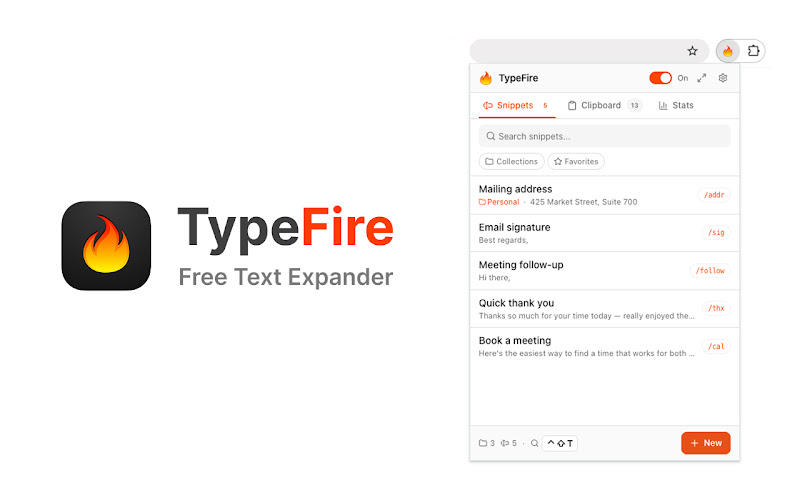
The TypeFire popup. Drop AI tokens, dynamic data, and Markdown into any snippet.
TypeFire vs Compose AI
Honest side-by-side. Compose AI wins on auto-completion suggestions in the compose window. TypeFire wins on price, BYOK, and a full text expander with a Mac app.
| Feature | TypeFire | Compose AI |
|---|---|---|
| Price | Free forever | Free tier + Premium plan |
| AI rewrite / summarize / improve | Yes - in any snippet | Yes |
| BYOK (your own API key) | Yes - 5 providers | No - their bundled provider |
| AI requests through provider directly | Yes - browser to provider | No - relayed through their servers |
| Abbreviation expansion | Yes - full text expander | Limited |
| Dynamic tokens (date, clipboard, cursor) | Full set | No |
| Rich text + Markdown | Yes - both | Rich text only |
| Spotlight-style launcher | Yes - Cmd+Ctrl+T | No |
| Side panel | Yes | No |
| Native Mac app | Yes - free | No - browser only |
| Cloud sync required | No - local-first | Yes - account required |
| JSON export and import | Yes - full library | Limited |
Where Compose AI still wins
Compose AI has a polished AI writing experience with inline auto-completion suggestions that appear as you type in supported compose windows. It's a tight, focused product with a strong AI-first brand and the ghost-text completion flow is genuinely well-built.
If what you want is purely ghost-text suggestions in email and document compose windows, with nothing else to learn, Compose AI delivers that cleanly. TypeFire is a different shape: a text expander with explicit AI tokens you drop into a snippet, not inline auto-completion. If your workflow is abbreviation-triggered expansion (sig, addr, follow) with AI rewrites and translations layered on top, TypeFire covers that at $0 with a real Mac app companion.
One library, two surfaces
TypeFire ships as a free Chrome extension and a free native macOS app. Your snippets and AI prompt tokens round-trip between them through JSON export and import, so the same library works in browser text fields, native desktop apps, and the system-wide Spotlight-style launcher.
Frequently asked questions
Common questions from people switching from Compose AI to TypeFire.
Yes. TypeFire's Chrome extension and Mac app are both 100% free with no Premium tier. Compose AI has a free tier with usage limits and a paid Premium tier for more. TypeFire AI is free at the app level because you bring your own API key from a supported provider, so the only cost is what the AI provider charges you directly. There's a $0 path using Apple Intelligence (on-device), Gemini's free quota, or local Ollama.
Compose AI's AI runs through their infrastructure on their bundled provider with rate limits. TypeFire's AI is BYOK: you connect your own key from Apple Intelligence, Claude, OpenAI, Gemini, or local Ollama. Requests go directly from your browser to the AI provider whose key you supplied. We never proxy, log, or rate-limit them. The shape of usage is also different: TypeFire AI lives inside snippet tokens like {{ai:rewrite}}, {{ai:summarize}}, {{ai:translate:es}}, or {{ai:custom:your prompt here}}, triggered when you expand a snippet. Compose AI is mostly inline auto-completion in supported compose windows.
Compose AI has a polished ghost-text auto-completion experience inside supported compose windows. If what you want is purely inline suggestions in email and document compose boxes, with nothing else to learn, Compose AI delivers that cleanly. TypeFire is a text expander with AI tokens layered on, so the trigger model is different. The two products overlap on AI but solve adjacent problems.
Yes. TypeFire is a full text expander first and AI tooling second. Abbreviation triggers, dynamic tokens (date, clipboard, cursor), rich text editor, Markdown source files, Spotlight-style launcher, side panel, free native Mac app companion. The AI tokens are an additive layer on top of a complete text expansion product, not the whole product.
No. TypeFire works as a pure text expander with zero AI configured, and that path is free. If you want AI tokens, there's a free path using Apple Intelligence on macOS 26+ (fully on-device), Gemini's free API tier, or local Ollama. Heavier paid usage with Claude or OpenAI bills you directly with no TypeFire markup, typically a few cents per dozen requests.
Yes. The text expander is free and uncapped, with no subscription. Pro is $18 once and covers six separate features: unlimited clipboard clips, Selection Prompts, Prompt Chains, notes sync, note version history and saving from AI apps through MCP.
Also available as a Chrome extension
TypeFire also runs as a free Chrome extension that works in every web app on every site. Use it alongside the Mac app for full coverage, or as the only TypeFire surface if you live in your browser.
Loved by people who type all day.
Unprompted reactions from users, in their own words.
Used by people at
Company names are places where our users work. They do not imply endorsement or affiliation.