Free Text Expander for Chromebook
Chromebooks run ChromeOS, which means Chrome extensions are the canonical way to add features. TypeFire is a free text expander Chrome extension built for that model. AI tokens, rich text, no subscription, no per-seat fees.
Who uses TypeFire on Chromebook
Chromebook user base spans students, educators, and ChromeOS-first organizations. Each gets value from a free text expander differently.
Students
Save standard essay intros, citation formats, and common phrases. AI-powered rewrite and grammar fixes built in. Faster note-taking in Google Classroom assignments.
Type "zintro" for your standard essay opener. Type "zcite" for an MLA citation template.
Teachers and school staff
Canned feedback comments for assignments. Standardized parent communication templates. Quick fill for grading rubric notes. All free for any number of educators in your district.
Type "zgrade" for a rubric-based feedback template. Type "zparent" for a parent-meeting confirmation.
ChromeOS-first companies
Companies that standardize on Chromebooks for cost or simplicity reasons get a free text expander for the whole team. No per-seat licensing means no growing cost as you hire.
Sales reps using web Salesforce. Support agents using web Zendesk. Operations teams in web tools.
Kiosk and shared Chromebook operators
Customer-facing kiosks need consistent reply templates. Shared Chromebooks in libraries, hotels, or healthcare benefit from snippet libraries that don't require local file storage.
Hotel front-desk standard responses. Library kiosk help text. Hospital admin replies.
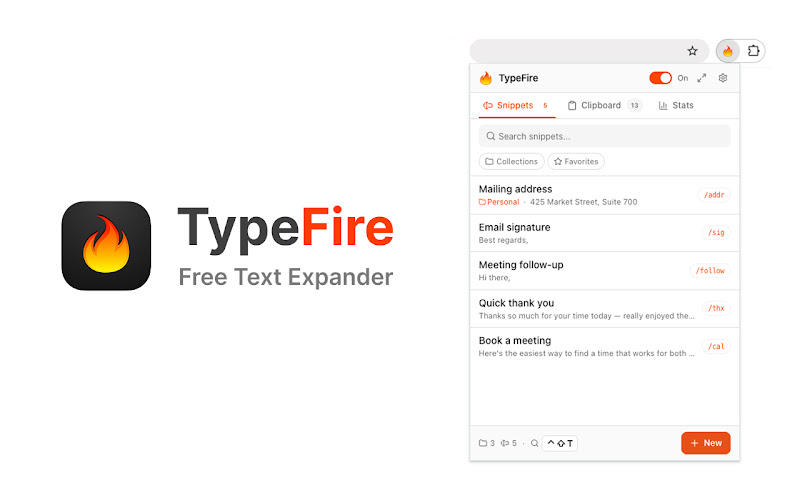
What Chromebook users see. Same popup, no native app needed.
What you get on Chromebook
Works in every web app
Google Workspace (Gmail, Sheets, Slides, Classroom), Slack web, Discord, Notion, ChatGPT, GitHub, and any other website with a text input.
AI tokens
Drop {{ai:rewrite}}, {{ai:fix}} (grammar), or {{ai:summarize}} into any snippet. Bring your own API key, free path via Gemini's free tier.
Spotlight-style launcher
Press Ctrl+Shift+E to open a fuzzy search modal across all your snippets. Type a few letters, pick a snippet, paste.
Rich text and Markdown
Snippets can include formatted text, lists, links, code blocks. Markdown source expands as formatted HTML in apps that accept rich content.
Frequently asked questions
Yes. Chromebooks run ChromeOS, which means Chrome extensions are the primary install path. TypeFire's Chrome extension installs from the Chrome Web Store directly to your Chromebook and works in every text field across every website.
Chromebook users do everything in the browser: Google Docs, Gmail, Google Classroom, Slack web, ChatGPT, Discord, GitHub Codespaces. A text expander cuts the repetitive typing across all of those. Students save time on assignment intros and citations. Teachers and admins reuse standard responses. Kiosk operators standardize customer-facing replies.
TypeFire only requires Chrome extension permissions: storage (for the snippet library), keyboard reading inside editable text fields (for abbreviation detection), and host access to detect typing on pages. It does not transmit page content, browsing history, cookies, or personal data. School IT administrators can review the extension's full privacy policy at typefire.app/legal and the listing in the Chrome Web Store. Note: school-managed Chromebooks may require admin approval to install extensions.
Yes. The Chrome extension is free with no paid tier, no trial, no per-seat fees. Important for school districts and educational institutions where licensing budgets are tight.
Honest answer: Google Docs is an edge case. Docs renders text to a canvas element and uses a custom paste pipeline that browser extensions cannot reliably tap into. TypeFire detects when you're on a Docs page and shows a 'not supported' notice. For Docs-specific text expansion on Chromebook, Google's built-in text replacement (Settings → Advanced → Languages → Spell check and Text shortcuts) is the only option. TypeFire works in Gmail, Google Sheets, Google Slides, and every non-Docs Google app.
Loved by people who type all day.
Unprompted reactions from users, in their own words.
Used by people at
Company names are places where our users work. They do not imply endorsement or affiliation.