Chrome Text Expander for Gmail: 12 Snippets That Save Hours
Gmail is where most people first notice they are typing the same thing over and over. The same opener. The same scheduling line. The same follow-up two days later. A text expander turns each of those into one short abbreviation.
This guide gives you 12 ready-to-paste Gmail snippets for TypeFire's free Chrome extension. Each one includes the abbreviation, the expansion, and the dynamic or AI tokens that make it work.

If you have not installed TypeFire yet, grab it from the Chrome Web Store first. Then come back and load these up.
How tokens work in TypeFire
A quick primer. Inside any snippet you can drop:
{{date}}and{{time}}for the current date and time{{clipboard}}to insert whatever is on your clipboard{{cursor}}to land your cursor at a specific point after expansion{{ai:rewrite}},{{ai:summarize}},{{ai:translate:fr}}, and custom AI prompts{{snippet:abbr}}to nest one snippet inside another
All tokens work the same way in Gmail compose and reply.
1. Email signature
Abbreviation: ;sig
Best,
Sam Chen
Head of Operations, Acme Co.
sam@acme.co | (555) 010-2244
acme.co
The single most-used snippet anyone has. Save your signature once and stop pasting it from a Notes app.
2. Quick reply: acknowledged
Abbreviation: ;ack
Got this, thanks. I will get back to you by end of {{date}}.

{{snippet:sig}}
The cursor lands after the signature. Nests your signature snippet so any update to ;sig propagates everywhere.
3. Scheduling request
Abbreviation: ;sched
Happy to find time. Here are a few options for next week:

- Tuesday, 10 to 11 AM PT
- Wednesday, 2 to 3 PM PT
- Thursday, 9 to 10 AM PT

Let me know what works and I will send a calendar invite.

{{snippet:sig}}
Edit the times in 10 seconds instead of writing the whole block.
4. Follow-up nudge
Abbreviation: ;nudge
Hi {{cursor}},

Following up on my note from last week. Did you get a chance to take a look?

Happy to hop on a quick call if it is easier to talk through.

{{snippet:sig}}
The cursor lands at the recipient's name so you can drop it in without arrow-keying back.
5. Out of office
Abbreviation: ;ooo
I am out of office until {{cursor}} and will respond when I am back. For anything urgent, please reach out to my colleague at colleague@acme.co.

Thanks,
Sam
Land the cursor on the return date, type it, send.
6. Intro request
Abbreviation: ;intro
Hi {{cursor}},

Hope you are well. I am working on something I think would benefit from a conversation with [PERSON]. Would you be open to making the intro?

I have included a short blurb below you can forward.

---

[Blurb]

Thanks,
Sam
7. Rewrite the highlighted text
Abbreviation: ;polish
{{ai:rewrite}}
Highlight a rough draft in Gmail compose, type ;polish, and TypeFire's AI token rewrites the selection in place. Works with Claude, OpenAI, or Gemini depending on your API key setup.
8. Summarize the thread you just copied
Abbreviation: ;tldr
TL;DR:

{{ai:summarize:clipboard}}
Copy a long email thread, type ;tldr in your reply, and you get a clean summary to paste into a forward or a Slack handoff.
9. Translate this draft
Abbreviation: ;trfr
{{ai:translate:fr}}
Highlight your English draft, type ;trfr, and TypeFire's translate token swaps it for French in place. Add ;trde, ;tres, ;trpt for German, Spanish, and Portuguese variants.
10. Status update template
Abbreviation: ;status
Quick update:

- What I shipped: {{cursor}}
- What I am working on:
- Blockers:

Let me know if anything needs a deeper conversation.

{{snippet:sig}}
Daily standup-style updates without the boilerplate.
11. Address book
Abbreviation: ;addr
Acme Co.
123 Market Street
San Francisco, CA 94103
United States
Mailing address, billing address, vendor onboarding forms. One snippet, every form.
12. Calendar link
Abbreviation: ;cal
Here is my calendar: https://cal.com/sam-chen

Pick a slot that works for you and I will see you there.

{{snippet:sig}}
End the back-and-forth scheduling chain with a link.
Tips for using these in Gmail
A few things that make the experience smoother.
- Compose in plain text mode first to confirm the snippets expand cleanly, then switch to rich text once you know the formatting holds
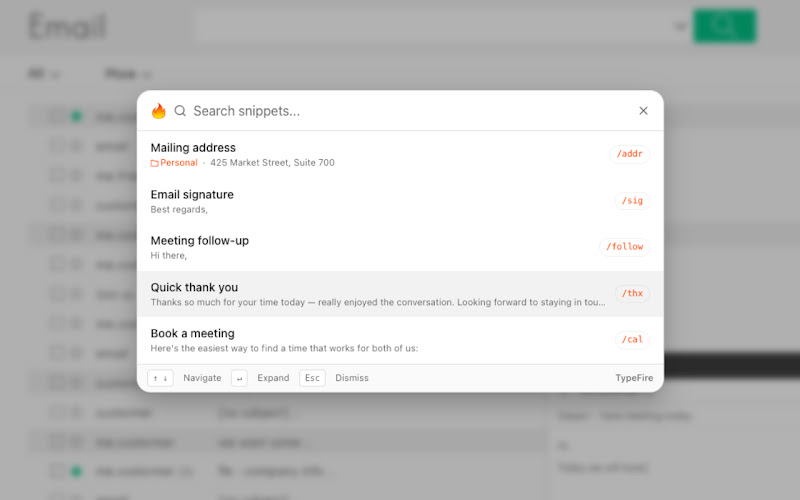
- Use the Spotlight launcher (Ctrl+Shift+E on Windows and Linux, Cmd+Ctrl+T on Mac) when you forget an abbreviation
- Pin the TypeFire side panel while you are in Gmail to edit snippets without leaving the inbox
For a wider library of email templates including signatures, follow-ups, and out-of-office variations, see our email templates guide.
What about the Mac app
The same library works inside Apple Mail, Outlook desktop, and any other native mail client through TypeFire's free Mac app. Export your snippets from the Chrome extension as JSON, import on Mac, and you have one library across every surface you write email in. See the Mac landing page for the full feature list.
Get started
Install TypeFire from the Chrome Web Store, paste in these 12 snippets, and try sending your next three emails using only abbreviations. You will feel the time savings inside an afternoon.
The Chrome extension overview has the rest of the feature set.
Loved by people who type all day.
Unprompted reactions from users, in their own words.
Used by people at
Company names are places where our users work. They do not imply endorsement or affiliation.