Type three characters. Get the whole thing.
Every Mac app, every website
Mail, Slack, Xcode, a browser form, a terminal. Type the abbreviation and the full text is there.
Unlimited, and free
As many snippets, collections and tags as you want, with no card and no countdown.
The same library in Chrome
Windows, Linux and ChromeOS get every snippet through the free extension.
A text expander that works in every Mac app and website.
Type the abbreviation you chose and the full text replaces it the moment you finish, with no trigger key and no menu. Three or four characters become a paragraph, a signature, an address, a reply you send ten times a day. It works the same in a native app, a web form and a terminal.
Abbreviations you choose
Short, memorable, and yours. Type them anywhere and the full text is there.
In place, wherever you are
It happens inside the field you are typing in. Nothing opens and nothing is copied, so you never leave what you were doing.
Off where you want it off
Keep expansion out of the terminal, or any app where an abbreviation is also a word.
Marcus, here is where the review landed. The short version first:
Sign up is at 100%, first snippet went from 31% to 71%.
Best,
Alex Chen
Head of Product, Northwind
alex@northwind.co
Snippets that ask, calculate and remember.
One invoice snippet stops to ask for the client and the amount, works out the date thirty days from now, and drops in the link you copied a minute ago. Fixed text, live tokens and fill-in fields live together in the same snippet, so one template stays current forever.
Tokens that resolve as it expands
The date and time in the format you asked for, whatever is on the clipboard, or another snippet by its abbreviation. One template, always current.
{{date}}{{time}}{{clipboard}}{{cursor}}Fill-in fields that ask
A placeholder pauses the expansion and puts up a small form. Answer it and the text lands complete, so one invoice snippet serves every client.
{{fill:Client}}{{fill:Amount}}Rich text and Markdown
Bold, links, lists and inline images survive the trip into Mail or Pages. Markdown pastes as formatted text where the destination can take it.
Scripts, when you want them
A snippet can be a JavaScript or AppleScript program, and whatever it returns is what gets pasted.
AI on the text you already wrote, in the app you wrote it in.
Three ways to put a model to work without opening a chat window. AI tokens run inside a snippet as it expands. Selection Prompts rewrite text you highlight, where it sits. Prompt Chains run several prompts in order on one keystroke. All of it on the device with Apple Intelligence on Apple silicon or a local model on any Mac, or with your own key.
AI tokens inside a snippet, free
A snippet can rewrite, summarize or translate its own contents as it expands, so a reply template comes out in the tone you asked for. On the device, or with your own key.
{{ai:rewrite}}{{ai:summarize}}{{ai:translate}}Selection Prompts
Highlight text in any app, press the prompt's shortcut, and the result replaces the selection where it sits. A blunt message becomes a calmer one inside the same box, and it works inside your own notes too, where one undo puts the original back. Pro.
Prompt Chains
Several prompts on one keystroke, each working on the previous result. Call notes become a summary, the actions, a checklist and a translation, with a stepper naming each step. Pro.
A snippet library you own, in files anything can read.
Every snippet is a plain file in a folder you choose. Import from the expander you are leaving, sync between your own Macs through your own iCloud, and export the lot at any time. Discontinuing TypeFire leaves the library exactly where it is, readable by anything.
Plain files, in a folder you choose
Every snippet is a file on disk, readable in any editor. Export the whole library as Markdown or JSON whenever you like.
Imports from the tools you are leaving
TextExpander, aText, Alfred and Espanso, plus CSV, JSON and the Chrome extension, so a library built anywhere comes across whole.
iCloud sync, opt-in
Between your own Macs through your own iCloud Drive, as the same plain files. There is no TypeFire server holding a copy.
Keystrokes are never recorded
Expansion uses the macOS Accessibility permission, which you can revoke at any time. Nothing you type is stored or sent anywhere.
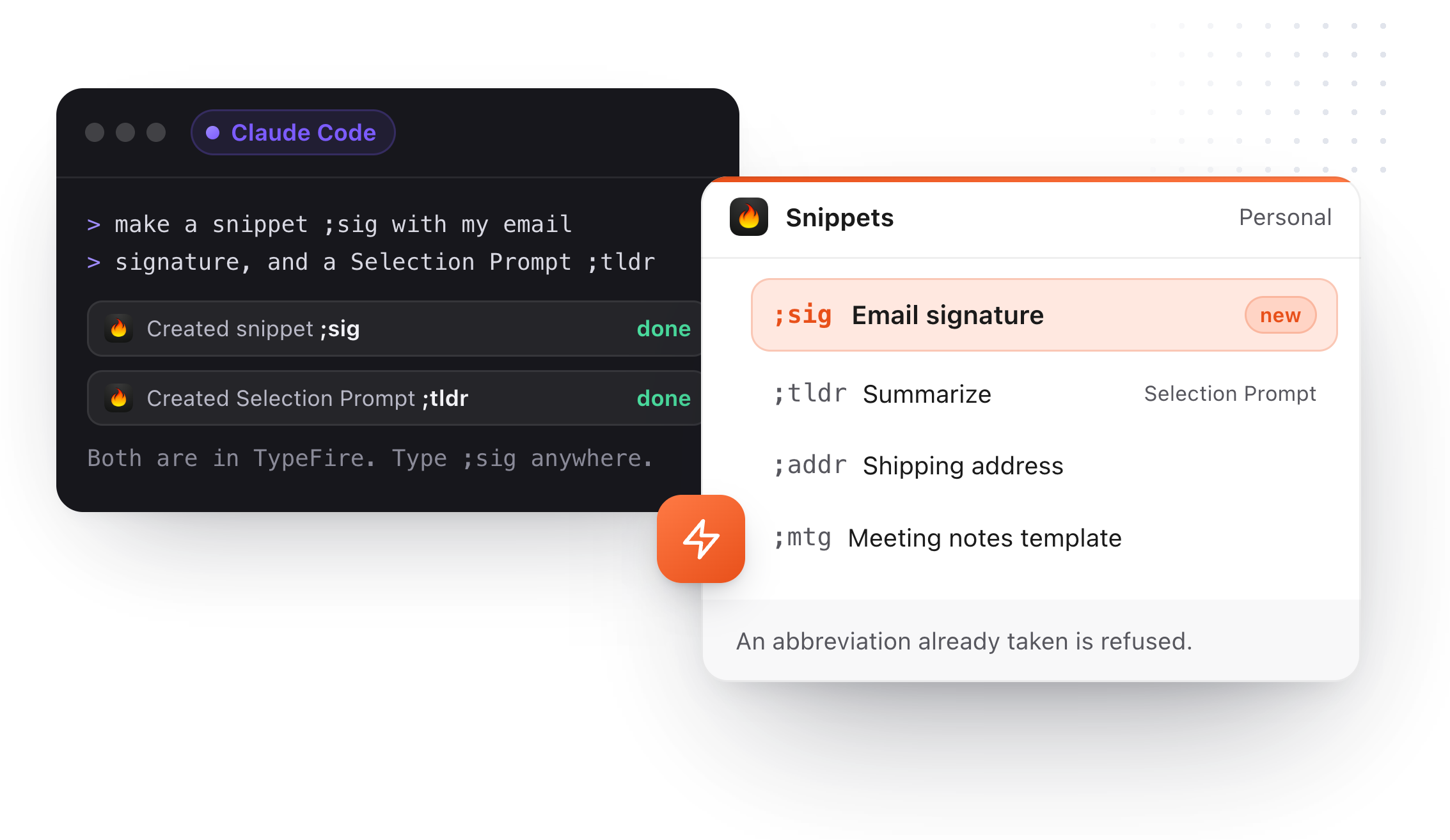
Ask Claude for a snippet. It's ready to type.
Claude, Cursor, Codex and other AI apps on your Mac can search your snippets through MCP, and with Pro create or edit any type. Connect each one in a click, no API key.
Search and read, free
"Which abbreviation holds the refund reply?" The AI looks it up in your library.
Create any type, with Pro
Plain snippets, Selection Prompts and chains. An abbreviation that's already taken is refused.
Then type it anywhere
A snippet an AI app made is in TypeFire straight away, ready to expand in any app.
One click per app
Settings, AI apps (MCP), Connect. Built for Claude, Claude Code, Cursor, Codex, VS Code, LM Studio and Windsurf.
The rest of Snippets.
The parts of a text expander that decide whether you keep using it after the first week.
Organized the way you already think
Collections nested as deep as you like, one per client if that is how you work. Tags across them for the snippets that belong in several places, favorites for the ones you reach for daily, and a launcher that searches all of it.
Expands inside your notes, too
The same abbreviation works in a TypeFire note, out of the same library. A paragraph you keep rewriting can become a snippet in one click.
Anything you copied can become a snippet
Give a clip an abbreviation and the thing you copied once is something you type three characters to get.
Per-app and per-snippet rules
Allow or block by application. Case sensitivity, and expand as you type or after a space, chosen per snippet.
A shortcut on any snippet
For the ones you fire fifty times a day.
Expansion stats
How often each fires, and the typing it saved.
Free in Chrome
Windows, Linux, ChromeOS. Free core; one Pro for both.
Eighteen dollars. Once.
TypeFire Pro is a single payment that unlocks unlimited clips, Selection Prompts, Prompt Chains, notes sync, note version history and saving from AI apps through MCP. There is no subscription and no per-seat pricing.
Free tier, then one payment
No free tier at all
One time
No free tier
One time
Or $29.99 a year, or $99.99 lifetime
Five snippets free, then a subscription
Snippets are free, all of them: unlimited, in every app, with tokens, fill-in fields and AI. Pro adds Selection Prompts and Prompt Chains, plus the clipboard and notes extras, for $18 once.
Questions about TypeFire Snippets
Where it works, what it costs, and what a snippet can do on the way in.
Still not answered?
TypeFire expands abbreviations in every native Mac app and every website: Mail, Slack, Xcode, Figma, a browser form, a terminal.
Type the abbreviation and the full text replaces it in place. The free Chrome extension runs the same snippets on Windows, Linux and ChromeOS in Chrome, Edge or Brave.
Yes. Unlimited snippets, collections and tags, abbreviation expansion in every app, the snippet launcher, dynamic tokens, fill-in fields, AI tokens with your own key, imports and iCloud sync are all free with no card and no countdown.
Pro, 18 dollars once, adds Selection Prompts and Prompt Chains along with the clipboard and notes extras.
Yes. A fill-in placeholder pauses the expansion and asks for the value, so one invoice snippet can prompt for the client and the amount, work out a due date thirty days out with a date token, and pull in the link you copied a minute ago with the clipboard token.
The same snippet holds fixed text, tokens and fill-in fields together.
Yes. TypeFire imports snippets from TextExpander, aText, Alfred and Espanso, as well as CSV, JSON and its own Chrome extension.
Everything exports back out as Markdown files or JSON, and the snippets themselves are plain files in a folder you choose, so nothing is locked in.
A Selection Prompt is a saved AI instruction you run on highlighted text in any app: select a blunt message, press its shortcut, and a calmer version replaces it in the same box without opening a window.
A Prompt Chain runs several prompts in order on one keystroke, each working on the previous result, so twenty lines of call notes become a summary, a list of actions, a checklist and a translation in one go. Both are Pro.
TypeFire never records, stores or transmits keystrokes.
Expansion needs the macOS Accessibility permission, which you can revoke at any time. AI tokens run on the device with Apple Intelligence or a local model, or go directly to Claude, OpenAI or Gemini with your own key, with no TypeFire server in the path. That key is held in the macOS Keychain.
Yes, from TypeFire 6.0. Connect Claude, Claude Code, Cursor, Codex or another AI app on your Mac in Settings, AI apps (MCP).
It can search and read your snippets for free, and with Pro create or edit any type, including Selection Prompts and chains. An abbreviation that's already taken is refused. The AI app doesn't type or expand snippets for you; you type the abbreviation as usual.
Keep reading
The case in full
TypeFire and TextExpanderImport and switch
Text expander for ChromeWindows, Linux, ChromeOS
AI on selected textSelection Prompts and Chains
Snippets for developersScripts and code
Snippet templatesReady to import
AI apps (MCP)Snippets in Claude and Cursor
TypeFire for ClaudeConnect in one click
What is new in 6AI apps, several at once
Loved by people who type all day.
Unprompted reactions from users, in their own words.
Used by people at
Company names are places where our users work. They do not imply endorsement or affiliation.