A free Markdown viewer for Mac.
Press Space to read it.
.md file as raw source: visible hash marks, visible asterisks, tables you cannot read. TypeFire is a free Markdown viewer and reader that renders it properly. Select the file in Finder and press Space, no app opens and nothing is imported.Space in Finder previews any Markdown file, rendered
Pick the one that asks least of you
Reading a Markdown file should not require choosing a writing app first. These are in order of least effort.
- 01
Press Space in Finder
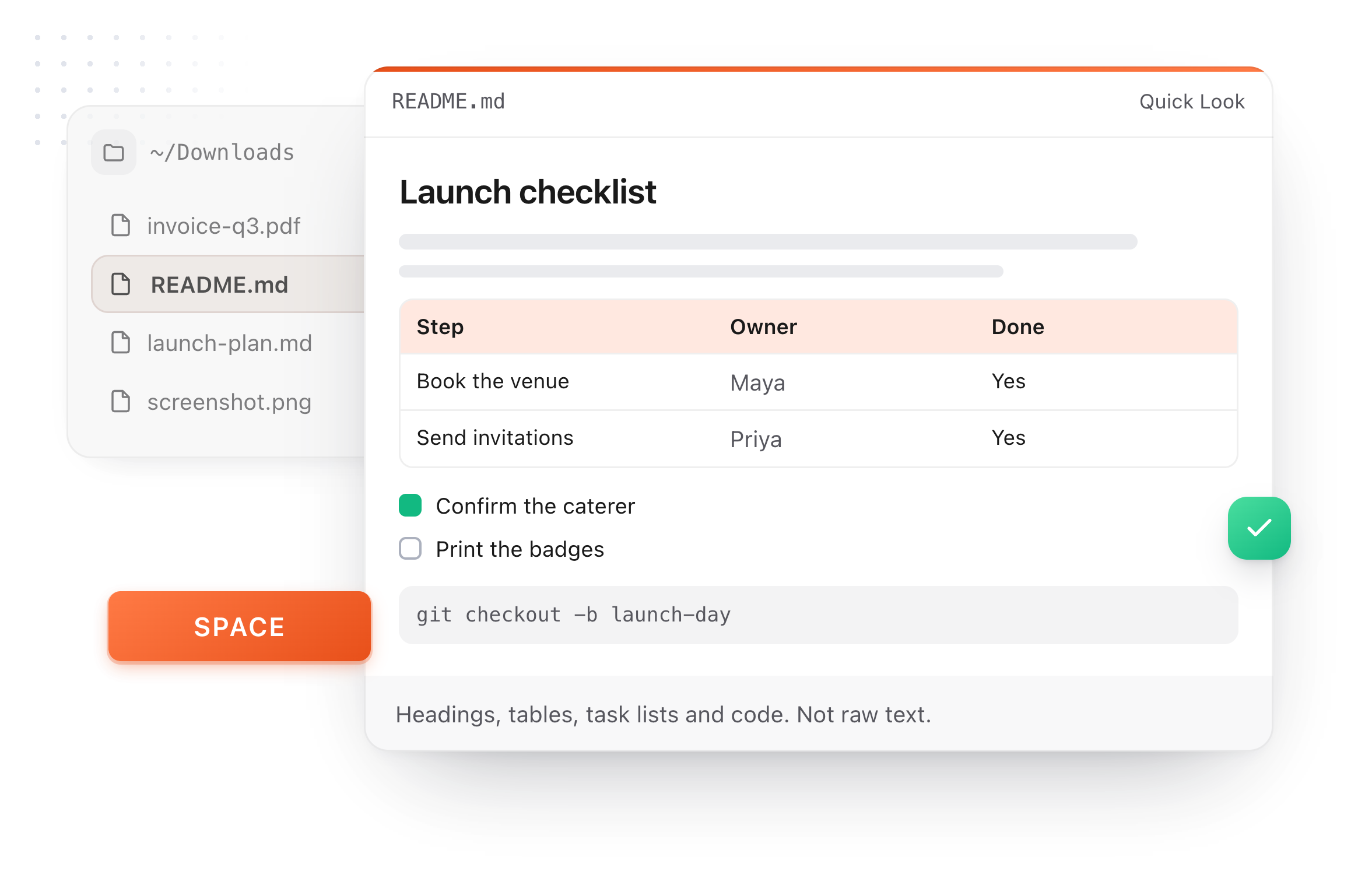
Select any .md file and press Space to preview it rendered: headings, lists, tables, code blocks and links. Arrow through a folder and read each one without launching anything. This is Markdown Quick Look, bundled and needing no setup.
- 02
Double-click it
Set TypeFire as the default app for .md in Get Info, and Markdown files open rendered instead of as source in a code editor. Opening a file does not import or move it. It is edited where it sits, in the Markdown editor.
- 03
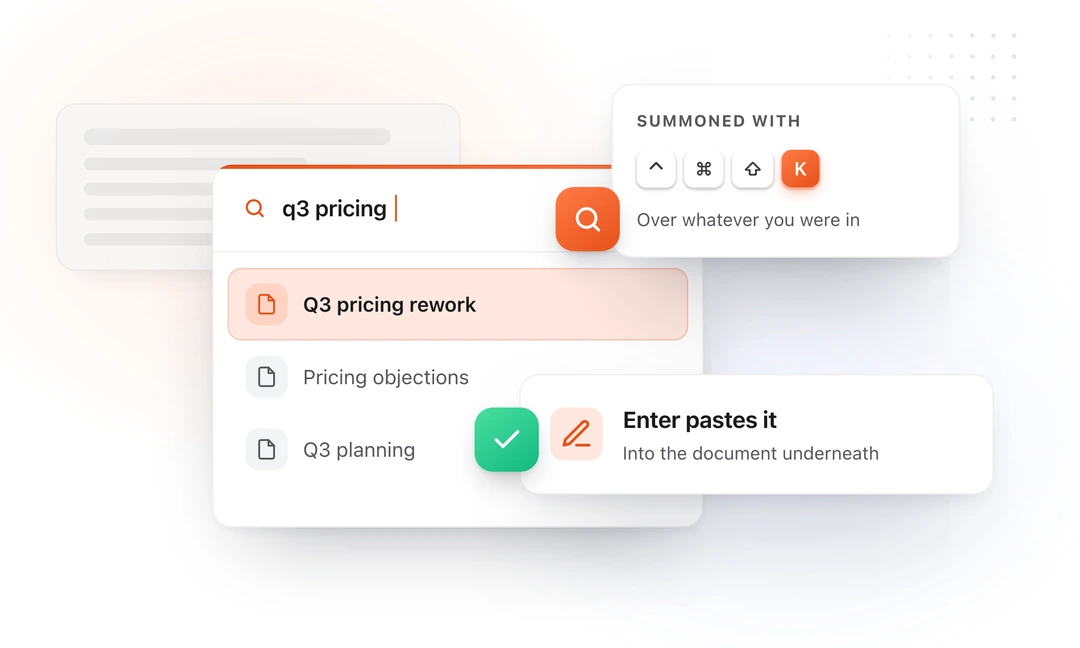
Search every note on a hotkey
⌘⌃3 searches your whole folder of Markdown from an overlay on top of whatever app you are in. Enter pastes that note's text into the document underneath. That overlay is part of Notes.
Markdown is where notes live now
Obsidian, Bear, Ulysses, iA Writer, every README and most static site content. All of it is .md files sitting in folders, and macOS still treats them as text.
Tables that are actually tables
Pipe-delimited Markdown is close to unreadable as source. Rendered, a table is the fastest thing in the document to scan.
READMEs that read like READMEs
A cloned repository is full of Markdown. Reading one should not mean parsing syntax or opening a code editor to see the formatting.
Your existing vault, untouched
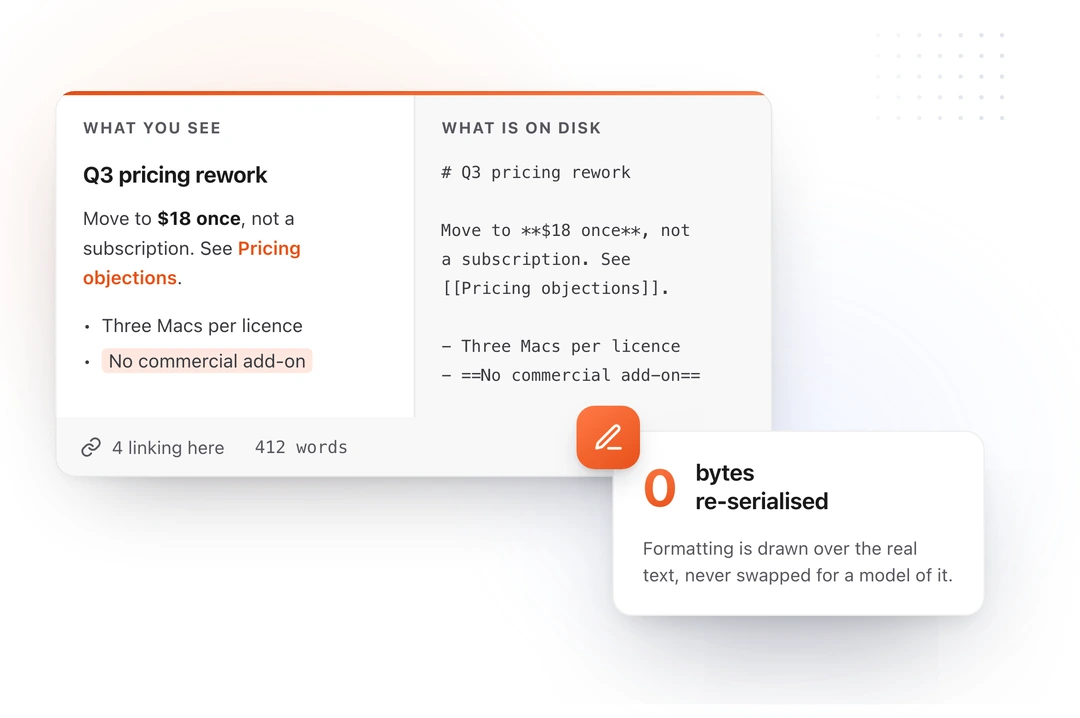
Point it at a folder you already have, including a real Obsidian vault, and it reads it in place. No import, no conversion, and Obsidian can stay open on the same files. Verified on a 10,012 file vault with zero files modified.
Reading and writing are the same app
When a file does need changing you are already in it. Wikilinks autocomplete, backlinks show what points at a note, and renaming a note retargets every reference in your own link style.
Markdown viewer questions
Still not answered?
Out of the box you cannot read one properly. macOS opens .md files in TextEdit or Xcode and shows the raw source: visible hash marks, visible asterisks, and pipe-delimited tables that are close to unreadable.
Install TypeFire and you get three ways to read one instead. Select the file in Finder and press Space to see it rendered.
Double-click it to open in a real Markdown editor, because TypeFire can be set as the default app for .md. Or press ⌘⌃3 anywhere in macOS to search every note in your folder and read it over whatever app you are already in. All three are free.
Yes. TypeFire reads and renders Markdown for free, with no trial countdown on it and no account tier that takes it away.
The paid tier is $18 once and unlocks six things: unlimited clipboard history, Selection Prompts, Prompt Chains, notes sync between your Macs, note version history, and saving and editing from AI apps through MCP. Reading, rendering, previewing in Finder, searching and editing Markdown are not among them.
Yes, and this is the fastest way to do it. TypeFire installs a Quick Look extension, so selecting any .md file in Finder and pressing Space renders it: headings, lists, tables, code blocks, blockquotes and links.
You can arrow through a whole folder of notes pressing Space and read each one without launching anything. It follows your system light and dark appearance.
Yes. Markdown reader, Markdown viewer, md viewer and md reader all describe the same thing: an app that draws the formatting instead of showing you the syntax.
There is no technical difference between the terms and no category of app that is one but not the other. What actually differs is how much each one asks of you before it will show you the file.
Some want you to import your notes into a library first, some want a subscription, and some are a full writing app you have to open and learn. TypeFire renders the file in Finder on Space, which asks nothing: no import, no account, and no app on screen.
A viewer renders the file so you can read it.
An editor lets you change it. Most people looking for a viewer want the first thing and do not want to be handed a writing app to get it, which is why the Finder preview matters: it is the closest thing to no app at all.
TypeFire is both, so nothing has to be decided up front. Press Space to read, and open the file only when you want to write.
Yes, and it reads the vault in place. There is no import, no copy, and no conversion, so Obsidian can stay open on the same files at the same time.
Wikilinks resolve, backlinks show what points at a note, and the raw Markdown in the file is left exactly as its author wrote it. This was verified on a 10,012 file test vault with zero files modified.
The parts you actually meet in notes and READMEs: headings, ordered and unordered lists, nested lists, tables, fenced code blocks, inline code, blockquotes, horizontal rules, bold and italic, task lists as clickable checkboxes, and links.
Obsidian's ==highlight== syntax renders too, using the same characters, so the file reads identically in both apps.
Yes. Right-click any .md file in Finder, choose Get Info, set Open with to TypeFire and click Change All.
From then on double-clicking a Markdown file anywhere opens it rendered rather than as source in a code editor. Opening a file this way does not import it or move it; TypeFire edits it where it sits.
macOS 13 Ventura or later, on Apple silicon and Intel.
It is a native Mac app, not a web page in a window, which is why the Finder preview and the system-wide hotkeys are possible at all. An iOS app is coming soon. There is no Windows or Android version.
Loved by people who type all day.
Unprompted reactions from users, in their own words.
Used by people at
Company names are places where our users work. They do not imply endorsement or affiliation.