The AI Note Taking App Problem: Your Notes Are Already Written
Almost every AI note taking app is built around the moment of capture. It listens to your meeting, it drafts from a prompt, it summarizes the page you are reading. All of that is useful, and none of it touches the problem most people actually have.
The problem is the notes you already wrote. Hundreds of them, maybe thousands, in a folder you have been adding to for years. You know you worked something out about pricing eighteen months ago. You cannot remember what you called the file, what heading it was under, or which of four projects it belonged to. Search wants the exact word you used, and the exact word is the thing you have forgotten.

Writing more notes does not fix that. Reading them does.
The short version
- Capture-first AI writes new notes. The harder job is reading the ones you have.
- Keyword search fails exactly when you need it: when you have forgotten your own phrasing.
- Turn on Weave and search matches meaning, so "what did we decide about pricing" finds a note that never says "decide".
- Ask which model runs where before pointing a tool at years of personal writing.
- Reading files in place beats importing, because an import gives you two copies to keep in step.
Why keyword search fails on your own notes
Search is exact. Your memory is not.
You search "pricing decision" and get nothing, because the note is titled "Q3 rework" and the relevant paragraph says "we settled on 18 flat". Every word in that sentence is correct and none of them is the word you typed.
This gets worse the longer the vault lives. Your vocabulary drifts. The project gets renamed. The thing you now call onboarding you used to call activation. Keyword search asks you to remember the past exactly, which is the one thing the notes exist to spare you.
What semantic search actually does differently
Search "what did we decide about pricing" and it surfaces the note that says "we settled on 18 flat", which shares not one word with the question.
Results come back ranked by how well they answer, not by how often a term appears.
The catch is that it needs an index, and an index has to be built by a model. Which model, and where it runs, is the whole question.
The question to ask before you point one at your notes
Most AI note tools do their reading on a server, which means your notes go there. For a work wiki that may be fine. For a decade of personal writing it is a decision worth making deliberately rather than by accepting a default.
TypeFire searches on your Mac. The part that makes search understand meaning is called Weave.
It runs on your Mac, with no account and nothing uploaded. Your clipboard history joins in when you say so, and anything you marked sensitive stays out of it either way.
Read the files in place, do not import them
An import creates a second copy. From that moment you have two versions of your notes and a job you did not want, which is keeping them in step.
Point at the folder instead. TypeFire opens a directory of markdown where it sits, including a real Obsidian vault, and reads it in place. Browsing and searching leave every file byte-identical. When you edit a note, only that file is written, and frontmatter keys it does not recognize are preserved exactly, including Dataview fields and plugin metadata.
That also means you keep your other apps. Most people write in Obsidian and use TypeFire to search, capture and ask from everywhere else.
Notes are not the only thing worth indexing
The thing you are looking for is often not a note.
It is the screenshot of a quote you pasted into Slack, or the paragraph you wrote once as a snippet and have been reusing ever since. TypeFire indexes all three: your notes, your clipboard history, and your snippet library, in one index. A question about a venue price can be answered by a PNG, because the words inside the image are read on device and indexed with everything else.
Seeing the shape, not just the list
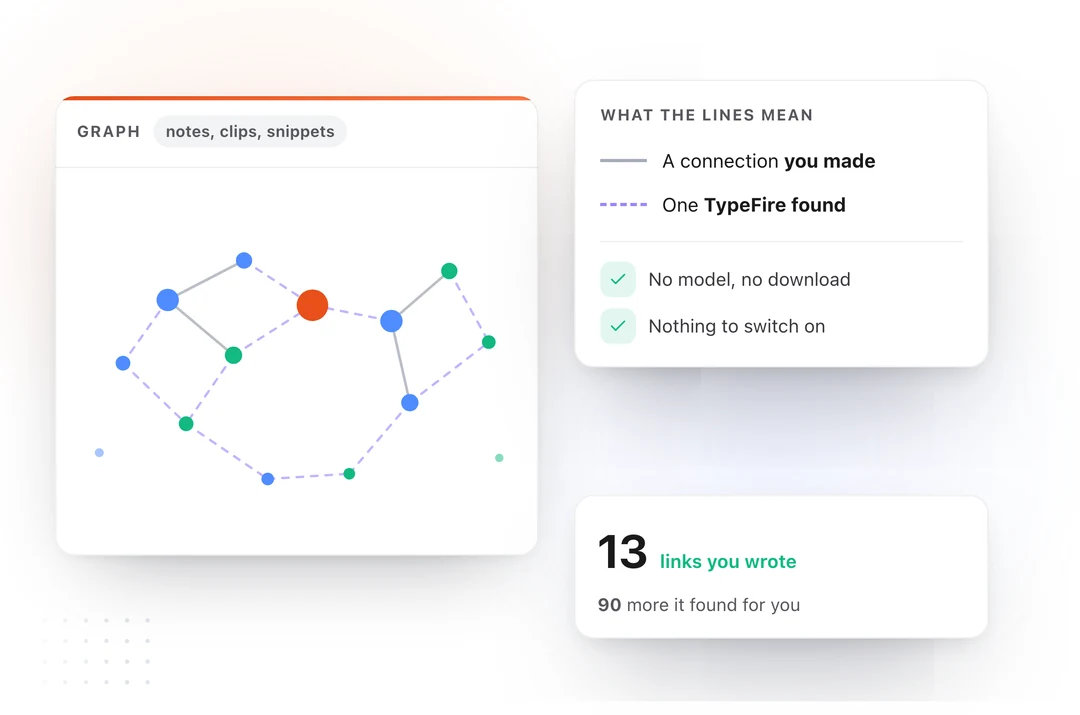
Search gives you a list. The graph gives you the shape.
Press the backtick key and TypeFire draws every note, snippet and clip on one canvas, built from the links, tags and folders already in your files. It needs no model and nothing downloaded, and it cannot be switched off.
Connections you made are drawn solid. Ones TypeFire worked out are drawn dashed, so you always know which is which.
Where this leaves the category
If you want a tool that sits in your meetings and writes the notes, buy one of those. They are good now.
If the notes exist and the problem is that you cannot get back to them, you want something that reads your own files, searches them by meaning, and shows you how they connect. That is a different product, and it is free.
And if the AI you want is Claude or Cursor rather than a model inside the notes app, TypeFire 6 connects them to your notes through MCP, so you can ask them about your own files. See TypeFire as an MCP server.
Download TypeFire for Mac, or read how it runs alongside Obsidian.
Loved by people who type all day.
Unprompted reactions from users, in their own words.
Used by people at
Company names are places where our users work. They do not imply endorsement or affiliation.