TypeFire 5.0: See How Everything You Have Written Connects
You accumulate hundreds of notes, thousands of clips and a snippet library you stopped auditing a year ago. Everything is in there. None of it is visible as a whole, and things that belong together stay apart because nothing ever shows you they are adjacent.

5.0 is about seeing the shape of it.
The short version
- The graph draws every note, snippet and clip on one canvas. Free, and nothing to download.
- Weave is optional. Turn it on and search finds what you meant, not the words you typed.
- Themes group the canvas into regions you can read at a glance.
- {{note:}} pulls a note's live text into a snippet, so a context document cannot go stale.
- Date math can carry a format now:
{{date:+1M:MMMM}}gives next month's name. - Free, including for existing owners. Nothing here moves behind Pro later.
The graph
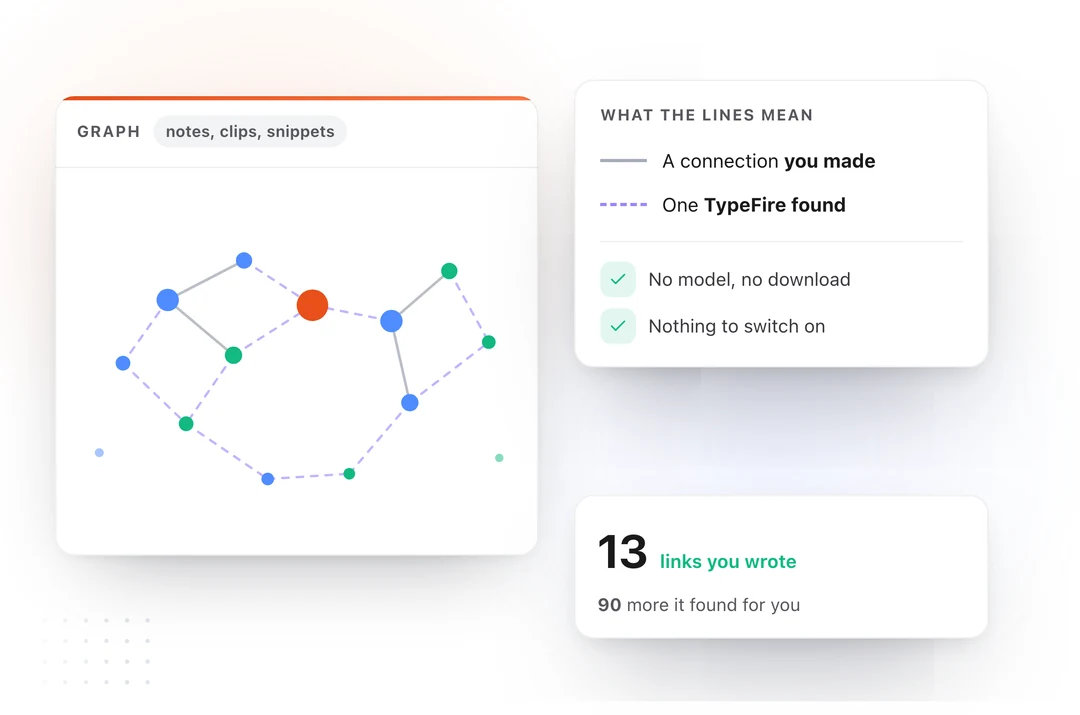
Press the backtick key and TypeFire draws everything you have: notes, snippets and clips, and the connections between them.
It reads what is already in your files. A wikilink you typed, a tag you added, the folder something sits in. That is a directory walk, so there is no model to fetch and no setup step. It works the moment you update, and it cannot be switched off.
Backtick sits directly left of 1, 2 and 3, which switch to snippets, clips and notes. Four views, one run of keys.
It opens on your whole vault, up to 1,500 items, rather than the handful around whatever note you happened to be in. Click a node to select it, double-click to open it, drag to pin it where you want it, scroll to zoom. The camera stays where you put it and only moves when you move it or press Fit.
Solid and dashed
A wikilink you typed is drawn solid. A connection TypeFire worked out is drawn dashed.
You can read the map at a glance because you always know which lines are yours.
Weave
Search used to match text. If you wrote "the renewal terms are brutal" and later searched "contract pricing", you got nothing, because you had to remember your own words to find your own writing.
Weave is a local index that fixes that. Turn it on and searching "contract pricing" finds the note about renewal terms, sharing not one word with the query. It also adds the dashed connections in the graph and the themes that color it.
You turn it on when you want it, and it runs entirely on your Mac. No account, and nothing uploaded.
Your clips join in when you say so, and anything you marked sensitive stays out of it either way. The one part that can call an AI provider is naming the graph's themes, which is its own switch and off by default.
Themes
A four thousand item graph is a gray disc. Themes group it by meaning and color the regions, which turns it into something you can actually read.
The grouping happens on your Mac. Naming those groups is the optional part that can ask your AI provider for a short label, and you turn it on or you do not.
{{note:}}
A snippet can now pull a note's live text in at the moment it expands.
Write {{note:Work::Product brief}} in a snippet and the note's current contents land wherever you type the abbreviation. Edit the note and every snippet using it is already up to date, because there is only one copy.
The obvious use is the context document you paste into an AI chat. It goes stale the day you edit the note it came from, and now it cannot. Pick Insert a Note from the T menu in the token toolbar and a picker opens across every vault, searchable by title, folder or vault name.
Date math with a format
{{date:+1M}} shifted the date and then ignored how you wanted it written. Now the two work together.
| Token | Output |
|---|---|
{{date:+1M:MMMM}} |
Next month's name |
{{date:+1d:dddd}} |
Tomorrow's weekday |
{{date:-7d:MMM D}} |
Apr 5 |
{{time:+2h:HH:mm}} |
Two hours from now |
This came from a user by email, who was right.
The shortcuts changed
The whole global layout moved. The old chords used Shift with a digit, and macOS claims every one of those for screenshots, so they were quietly doing nothing.
| Keys | Action |
|---|---|
` 1 2 3 |
Graph, snippets, clips, notes, inside the app |
⌘⌃\ |
Search everything |
⌘⌃1 ⌘⌃2 ⌘⌃3 |
Search snippets, clips, notes |
⌘⌃⇧N |
New quick note |
⌘⌃⇧M |
New Markdown window |
⌘⌃⇧\ |
Bring TypeFire forward |
Also in this release
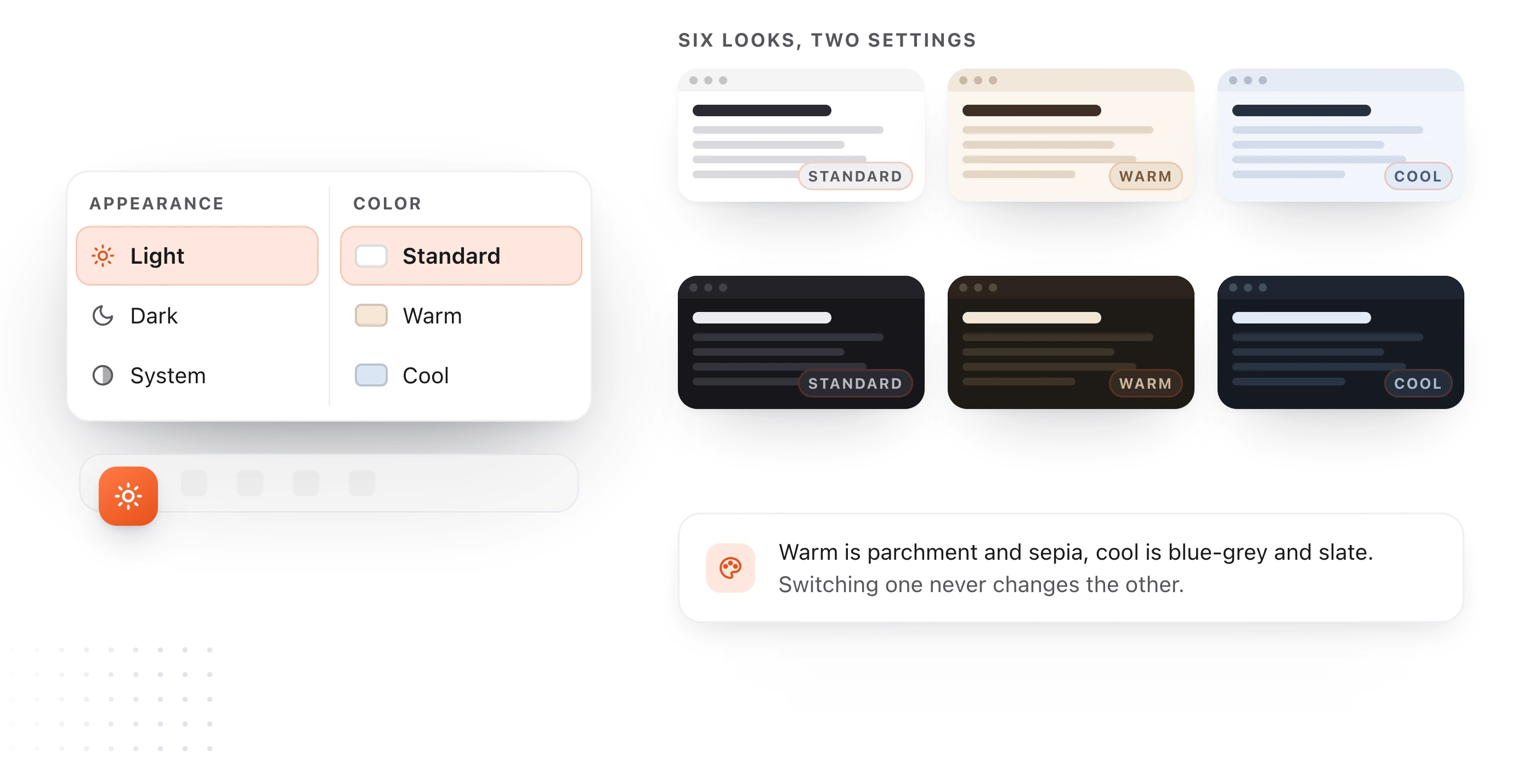
Two new surfaces, warm and cool, sitting on top of light and dark. Warm is parchment and sepia, cool is blue-gray and slate, and switching one never changes the other, so two settings give you six looks.
A shortcuts reference in the bottom bar under Help, showing your own bindings rather than the defaults, which matters more than usual this release.
A copy button on code blocks, in both editors, which copies the file's own text so indentation survives the paste. Guided tours rewritten in plainer language, each appearing on the first visit to its own surface. Eight starter Selection Prompts instead of three.
Pricing has not changed
All of 5.0 is free: the graph, Weave, semantic search and themes. That includes everyone who already bought Pro, at no extra cost, and none of it moves behind a paid tier later. Pro is still a one-time $18 covering three Macs.
Update from inside the app, or download TypeFire for Mac. Then press backtick and look at what you have been writing.
Further reading: making Obsidian's graph view useful and what AI note taking apps miss.
Loved by people who type all day.
Unprompted reactions from users, in their own words.
Used by people at
Company names are places where our users work. They do not imply endorsement or affiliation.