Obsidian AI Plugins, and When You Want an Index Instead
The Obsidian plugin ecosystem is the best thing about Obsidian. If you want AI in your vault, there is a plugin for whichever version of that you mean, and several of them are excellent.
It is worth being precise about which version you mean, because the three kinds solve different problems and only one of them changes how you use your notes.
The short version

- Writing plugins act on the note in front of you. Useful and limited by design.
- Search plugins index the vault, which is the group that changes your habits.
- Check where each plugin sends things. Embedding and chat are separate steps with separate answers.
- A plugin can only see the vault. Your clipboard and snippets are outside it.
- An app reading the same folder from outside gets the whole picture without a plugin.
The three kinds, and what each is for
Writing helpers work on a selection. Rewrite this paragraph, continue this thought, turn these bullets into prose. They are the easiest to build, which is why there are the most of them, and they are genuinely handy.
Their ceiling is the note you have open. The model sees your selection and whatever the plugin chooses to send with it, and that is all it knows about you.
Search plugins index the vault so you can find notes by meaning rather than by keyword, without remembering the exact words you used. Smart Connections is the best known of these and it works well.
This is the group worth your attention, because it fixes the actual failure of a large vault: you cannot search for the word you have forgotten.
Connector plugins suggest links between notes. Useful for tidying, less transformative than the second group.
The question to ask each one
Where does it read your notes, and where does it send them?
A plugin that finds things by meaning has to read your whole vault to do it. A plugin that rewrites a paragraph only sees the paragraph. Those are very different amounts of your writing, and a readme does not always make the difference obvious.
Since plugins run with broad access to the vault, this is worth ten minutes before you install rather than after.
The limit every plugin shares
A plugin lives inside Obsidian, so it can see the vault and nothing else.
That sounds obvious and it matters more than it seems, because a surprising amount of what you want back is not in the vault. The screenshot of a quote that you pasted into Slack. The paragraph you wrote once and have been reusing as a snippet ever since. The error message you copied last Tuesday.
Those live in your clipboard history and your snippet library. No vault plugin can reach them, so the answer to "what did we agree to pay for the venue" is only ever as good as whether you happened to write it into a note.
What reading the vault from outside changes
TypeFire opens the same folder of markdown Obsidian reads, in place, and puts your clipboard history and your snippet library on the canvas beside it.
The practical difference is what is in the picture. The screenshot you copied in August is there. So is the paragraph you saved as a snippet and have reused forty times. A vault plugin cannot reach either of those, because they were never notes.
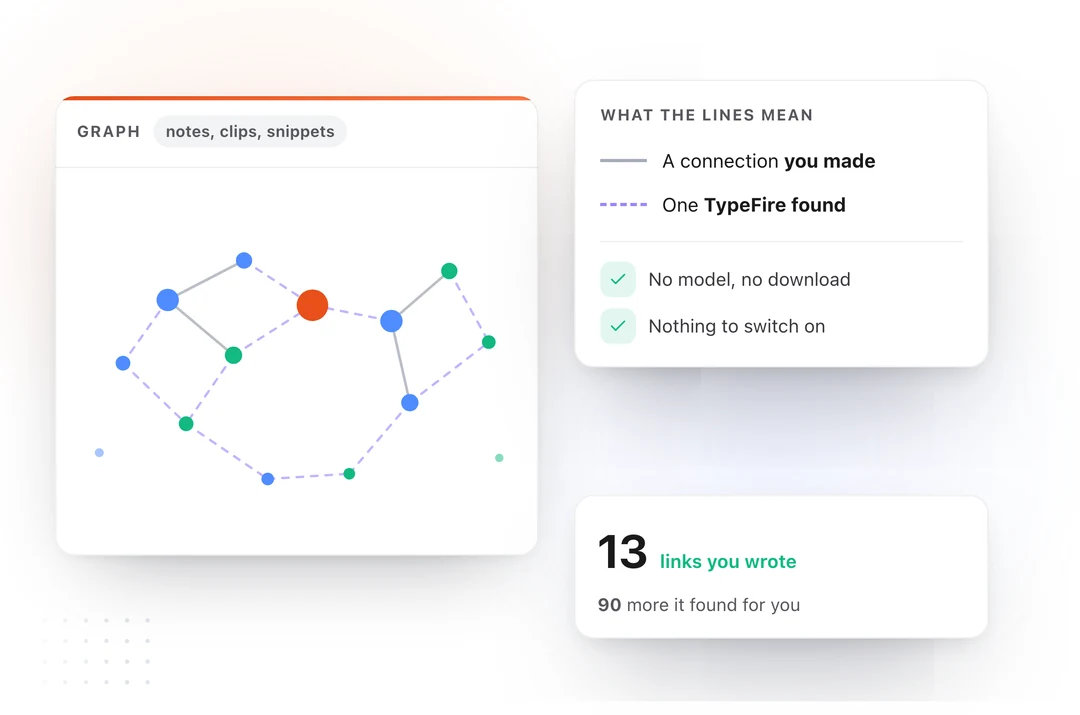
The graph needs nothing to draw. Links, tags and folders are already in your files, so there is no model to fetch and no setup step, and it cannot be switched off. Connections you made are solid and ones TypeFire worked out are dashed, so a guess never passes as your own reasoning.
Turn on Weave and search starts matching meaning rather than exact words. It runs on your Mac, with no account and nothing uploaded, and your clips are included when you say so.
You do not have to choose
None of this replaces Obsidian and it does not ask you to uninstall anything. It reads the vault as files, so your plugins, your workspace and your themes are untouched.
Most people write in Obsidian and use TypeFire to search, capture and ask from every other app on the Mac. The vault stays the source of truth, which is the reason you chose plain markdown in the first place.
It is free, including for people who already bought Pro.
From TypeFire 6 it also works the other way round: Claude, Cursor and Codex on your Mac can search and read the same vault through MCP, with no Obsidian plugin and no API key. That is on the Obsidian MCP page.
Download TypeFire for Mac, or read about running both together.
Loved by people who type all day.
Unprompted reactions from users, in their own words.
Used by people at
Company names are places where our users work. They do not imply endorsement or affiliation.