Free Alternative to TextExpander Chrome Extension
TextExpander's Chrome extension costs $40 per user per year. TypeFire's Chrome extension is free with the same core feature set plus AI tokens, dynamic data, and a Spotlight-style launcher. Import your existing snippets in fifteen minutes.
Why people switch from TextExpander Chrome to TypeFire
TextExpander is the established brand. These are the moments people start questioning the annual renewal.
$40/year per user adds up
Solo: $40/year. Team of 10: $400/year. Team of 50: $2,000/year. TypeFire is free for any team size, forever, with no per-seat licensing.
Subscription with no off-ramp
TextExpander locks features behind a renewing subscription. Cancel and lose access. TypeFire is a free download; uninstall whenever you want, snippet files stay yours as plain Markdown.
AI features at the Pro tier only
TextExpander Pro charges extra for AI assist. TypeFire ships AI tokens free at the app level (bring your own API key). Use Apple Intelligence, Claude, OpenAI, Gemini, or local Ollama.
Their cloud, your data
TextExpander syncs through their own infrastructure on the paid plan. TypeFire's Chrome extension stores snippets locally in your browser. Optional iCloud Sync (via the Mac app) goes through your own iCloud Drive, protected by your Apple account.
Markdown that expands as HTML
Write snippets in clean Markdown source. The extension converts to formatted HTML at expansion time. TextExpander supports rich text but not native Markdown source files.
Free for everyone on your team
Install on as many machines as you need. Family members, colleagues, contractors, no per-seat math. The only thing each user does individually is verify their email once during sign-in.
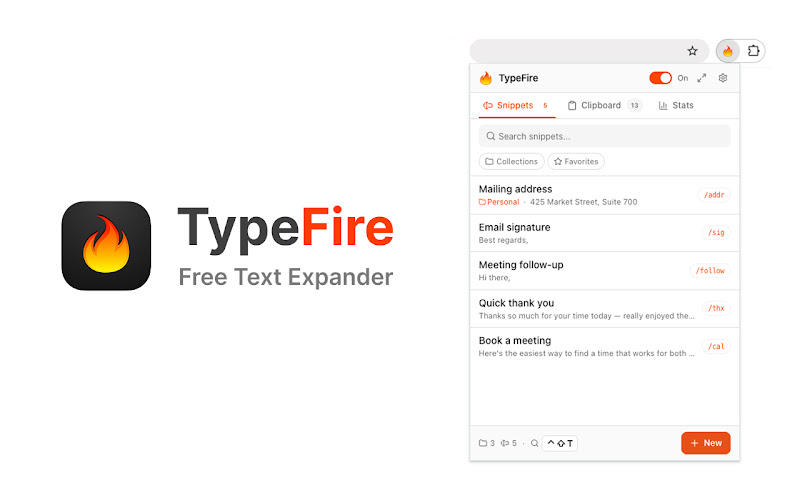
TypeFire's Chrome popup. Same surface, no subscription.
TypeFire vs TextExpander Chrome
Honest side-by-side. TextExpander wins on team workspace features. TypeFire wins on price and the modern feature set.
| Feature | TypeFire | TextExpander Chrome |
|---|---|---|
| Price | Free forever | $40/year per user |
| Subscription required | No | Yes |
| Chrome extension | Yes | Yes |
| Companion Mac app | Yes - free | Yes - paid |
| Snippet import from TextExpander | Yes - CSV + legacy backup files | N/A |
| AI tokens in snippets | Free with BYOK | Paid Pro tier |
| Rich text editor | Yes - TipTap | Yes |
| Markdown source expansion | Yes - expands as HTML | No |
| Dynamic tokens | Full set | Full set |
| Spotlight-style launcher | Yes - Cmd+Ctrl+T | No |
| Local-first snippet storage | Yes | Their cloud |
| Team workspace | No - via shared folder sync | Yes - paid |
| Per-seat licensing | No | Yes |
Frequently asked questions
Common questions from people switching from TextExpander Chrome to TypeFire.
Yes. TextExpander is free for five active snippets and $60 a year per user beyond that, with an account required. TypeFire's Chrome extension is free forever with unlimited snippets and no subscription. Same core feature set (abbreviations, dynamic data, rich text), plus AI tokens that TextExpander Pro charges extra for. For solo users and small teams, TypeFire delivers the equivalent experience at $0.
Yes. TypeFire's importer accepts TextExpander backup files. Export your library from TextExpander as a CSV or legacy .textexpander/.textexpandersettings file, then import directly into TypeFire. Most users complete the migration in under fifteen minutes regardless of library size.
Yes. TypeFire's Chrome extension works on every Chromium-based browser: Chrome, Edge, Brave, Arc, Opera, Vivaldi. TextExpander supports the same browsers via their Chrome extension. Both work cross-platform on Windows, macOS, Linux, and Chromebook.
Team collaboration features. TextExpander has built-in team workspaces, shared snippet libraries with permission controls, audit logs, and analytics. TypeFire does not currently include these team-specific features. For a 20+ person team that needs centralized snippet governance, TextExpander's paid plan delivers that out of the box. For solo and small-team workflows, TypeFire matches the core experience at $0.
Yes, and they're free at the app level. TextExpander Pro adds AI features at a higher subscription tier. TypeFire AI tokens are included in the free app, you bring your own API key. There's a free-tier path using Gemini's free API quota or local Ollama, so AI usage can be $0 total. Heavier paid usage with Claude or OpenAI bills you directly with no TypeFire markup.
Yes. The text expander is free and uncapped, with no subscription. Pro is $18 once and covers six separate features: unlimited clipboard clips, Selection Prompts, Prompt Chains, notes sync, note version history and saving from AI apps through MCP.
Loved by people who type all day.
Unprompted reactions from users, in their own words.
Used by people at
Company names are places where our users work. They do not imply endorsement or affiliation.