20 AI Prompts for Email, Ready to Copy
Twenty email prompts, each written for one job. Copy any of them into ChatGPT, Claude or Gemini and paste your thread underneath, or save them in TypeFire and run them on the draft you've already started, in any Mac app.
Most people prompt for email with one line: "write a reply to this." The reply that comes back is polite, long, and could have been sent by anyone. The prompts below fix that by saying who it's for, what it has to achieve, the tone, and how short it has to be. Every one also tells the model to use only the facts you give it, and to mark anything missing with a [bracket] rather than inventing it.
How to use these
In a chat window. Copy the prompt, paste the email thread or your notes under it, and send.
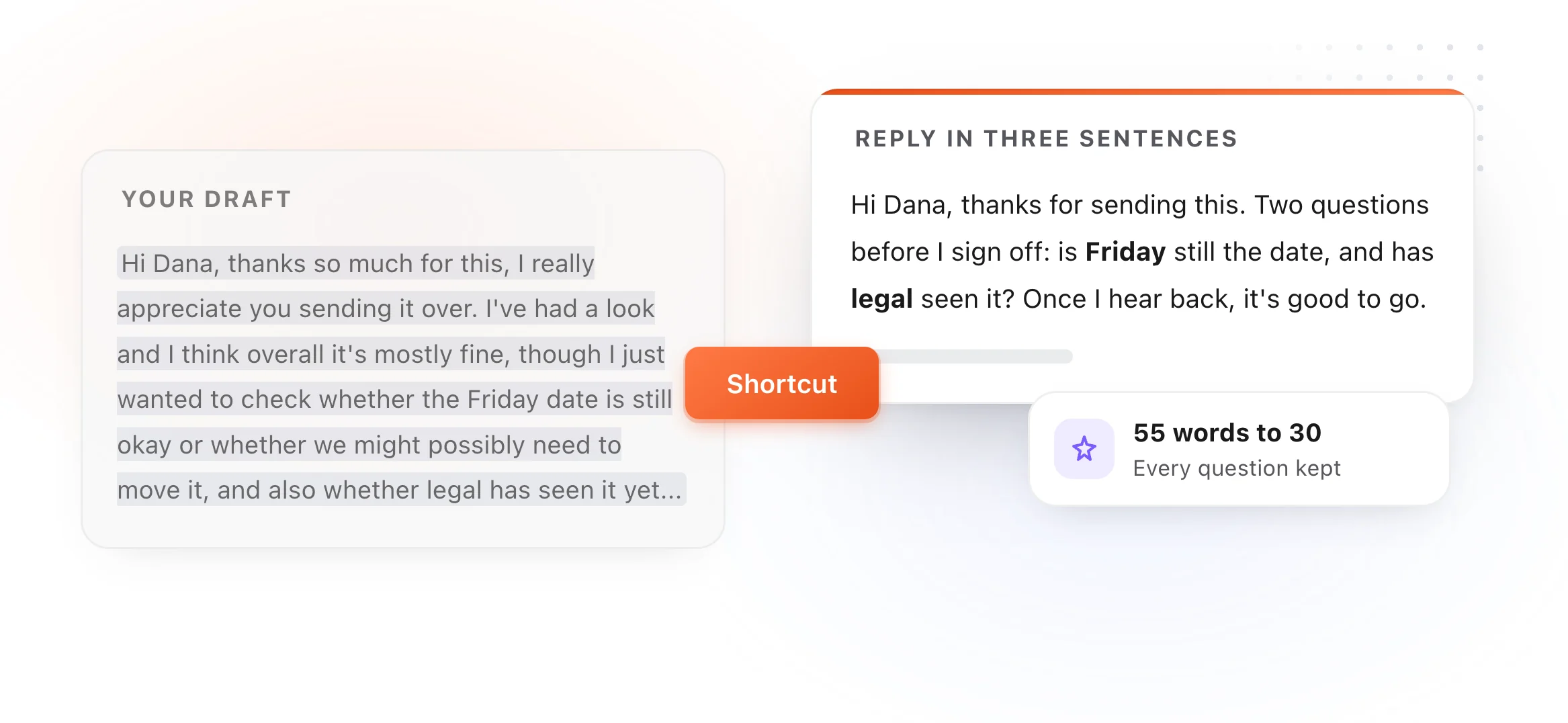
On your own draft, without a chat window. Save a prompt once as a Selection Prompt, highlight your draft in Gmail, Outlook or Apple Mail, and press its shortcut. The rewrite lands where your draft was.
The prompts
Saying no, and saying sorry · 7 · 8 · 9
Writing from scratch · 13 · 14 · 15
Fixing a draft · 16 · 17 · 18 · 19 · 20
Replying
1. Reply to a long email in three sentences
For the email that asks five things in eight paragraphs.
Write a reply to the email below in no more than three sentences. Answer what was asked, confirm any next step, and close. Plain, friendly tone. Use only facts from the email; put [brackets] where you need something from me.

[paste the email]
2. Answer every question in the thread
For the reply where missing one question means another round trip.
List every question or request in the email thread below, then write a reply that answers each one in order, one short paragraph each. If I haven't given you the answer, write [ANSWER NEEDED] instead of guessing.

[paste the thread]
3. The reply when you need more time
For when the honest answer is "not yet."
Write a short reply saying I've received this, I'm working on it, and I'll come back by [date]. Don't over-apologize. One line on what I'm checking first, if the email makes that obvious.

[paste the email]
Following up
4. The polite nudge
For the email that got no answer.
Write a two-sentence follow-up to the email below. Assume they're busy, not ignoring me. Restate the one thing I need and make it easy to answer with a yes or no.

[paste my original email]
5. The second follow-up
For when the first nudge didn't land either.
Write a final, friendly follow-up to the email below. Offer the simplest way forward (a yes or no, a 10-minute call, or a default I'll go with on [date] if I don't hear back). Under 60 words.

[paste the thread]
6. The meeting recap
For the email nobody wants to write after a meeting.
Turn these meeting notes into a recap email: a one-line summary, the decisions, then the action items as a list with an owner and a date each. Mark anything without an owner as [OWNER?].

[paste notes]
Saying no, and saying sorry
7. Decline without a paragraph of apology
For the invitation, request or project you can't take on.
Write a short, kind reply that says no to the request below. One sentence of thanks, one clear no, and, only if it fits, one alternative. No long apology and no made-up excuses.

[paste the request]
8. Push back on a deadline
For the date that isn't going to work.
Write a reply that pushes back on the deadline in the email below. State what's realistic by [date], why in one sentence, and what I can deliver by the original date instead. Calm and specific.

[paste the email]
9. The apology that fixes something
For when something did go wrong.
Write an apology for the issue described below. Say what happened in one sentence, own it without excuses, say what's been done to fix it and what happens next. Under 100 words.

[describe what happened]
Asking
10. Ask a favor of someone busy
For the ask that has to be easy to say yes to.
Write a short email asking for the favor below. Say who I am in one line, the exact ask, why them, and how little time it takes. End with an easy out so a no costs them nothing.

[describe the favor and the person]
11. Ask for a decision
For the thread that's been open for two weeks.
Rewrite the thread below as an email asking for one decision. Lay out the options as a short list with one line on each, give my recommendation, and ask for a reply by [date].

[paste the thread]
12. The intro request
For asking a contact to introduce you.
Write an email asking [name] to introduce me to [person]. Include a short, forwardable paragraph about me and why the introduction is worth their time, so they can pass it on unchanged.

[my background and why I want the intro]
Writing from scratch
13. From bullet notes to an email
For when you know what to say but not how.
Turn the notes below into a clear email to [recipient]. Keep every fact, add nothing new, order it so the most important point comes first, and keep it under 150 words.

[paste notes]
14. The announcement
For telling a team or customers about a change.
Write an announcement email about the change below. Lead with what changes for the reader and when, then why, then what they need to do (if anything). Use a short list for steps. No hype words.

[describe the change]
15. The cold email
For writing to someone who doesn't know you.
Write a cold email to [role] at [company] about [topic]. Open with something specific to them, not to me. Then one sentence on what I offer and one concrete ask. Under 90 words, no buzzwords, no "I hope this finds you well."

[what I know about them and what I offer]
Fixing a draft
16. Make it shorter
Cut the email below to half its length without losing any request, date or decision. Remove throat-clearing and repeated points. Keep my voice.

[paste the draft]
17. Make it warmer
Rewrite the email below so it sounds warmer and more human, without adding exclamation points or flattery. Keep the length about the same.

[paste the draft]
18. Make it firmer
Rewrite the email below so it's firmer and clearer about what I need, while staying polite. Remove hedging words like "just", "maybe" and "if possible".

[paste the draft]
19. The subject line
Write five subject lines for the email below. Each under 50 characters, specific to the content, and none of them clickbait. Mark the one you'd send.

[paste the email]
20. Write it like me
For making every other prompt sound like you.
Here are three emails I've written. Describe my tone, sentence length and sign-off in five bullet points. Then rewrite the draft at the end in that style.

[paste three of my emails]
---
[paste the draft]
Keep them one keystroke away
Hunting for this page every time you need a prompt is the slow part. Two ways to keep them close, both in TypeFire:
- As snippets, free. Save each prompt as a snippet and type a short abbreviation, like
;reply3, in ChatGPT, Claude or anywhere else to drop the whole prompt in. - As Selection Prompts, with Pro. Highlight your draft in any Mac app, press a shortcut, and the rewrite replaces it. It runs on your own API key, or on a model on your Mac through Apple Intelligence, Ollama or LM Studio. See how it works.
More prompt sets: AI prompts for writing and editing, AI prompts for summarizing, AI prompts for code review, and all of them in one place in AI prompt examples.

Twenty email prompts, each written for one job. Copy any of them into ChatGPT, Claude or Gemini and paste your thread underneath, or save them in TypeFire and run them on the draft you've already started, in any Mac app.
Most people prompt for email with one line: "write a reply to this." The reply that comes back is polite, long, and could have been sent by anyone. The prompts below fix that by saying who it's for, what it has to achieve, the tone, and how short it has to be. Every one also tells the model to use only the facts you give it, and to mark anything missing with a [bracket] rather than inventing it.
How to use these
In a chat window. Copy the prompt, paste the email thread or your notes under it, and send.
On your own draft, without a chat window. Save a prompt once as a Selection Prompt, highlight your draft in Gmail, Outlook or Apple Mail, and press its shortcut. The rewrite lands where your draft was.
The prompts
Saying no, and saying sorry · 7 · 8 · 9
Writing from scratch · 13 · 14 · 15
Fixing a draft · 16 · 17 · 18 · 19 · 20
Replying
1. Reply to a long email in three sentences
For the email that asks five things in eight paragraphs.
Write a reply to the email below in no more than three sentences. Answer what was asked, confirm any next step, and close. Plain, friendly tone. Use only facts from the email; put [brackets] where you need something from me.

[paste the email]
2. Answer every question in the thread
For the reply where missing one question means another round trip.
List every question or request in the email thread below, then write a reply that answers each one in order, one short paragraph each. If I haven't given you the answer, write [ANSWER NEEDED] instead of guessing.

[paste the thread]
3. The reply when you need more time
For when the honest answer is "not yet."
Write a short reply saying I've received this, I'm working on it, and I'll come back by [date]. Don't over-apologize. One line on what I'm checking first, if the email makes that obvious.

[paste the email]
Following up
4. The polite nudge
For the email that got no answer.
Write a two-sentence follow-up to the email below. Assume they're busy, not ignoring me. Restate the one thing I need and make it easy to answer with a yes or no.

[paste my original email]
5. The second follow-up
For when the first nudge didn't land either.
Write a final, friendly follow-up to the email below. Offer the simplest way forward (a yes or no, a 10-minute call, or a default I'll go with on [date] if I don't hear back). Under 60 words.

[paste the thread]
6. The meeting recap
For the email nobody wants to write after a meeting.
Turn these meeting notes into a recap email: a one-line summary, the decisions, then the action items as a list with an owner and a date each. Mark anything without an owner as [OWNER?].

[paste notes]
Saying no, and saying sorry
7. Decline without a paragraph of apology
For the invitation, request or project you can't take on.
Write a short, kind reply that says no to the request below. One sentence of thanks, one clear no, and, only if it fits, one alternative. No long apology and no made-up excuses.

[paste the request]
8. Push back on a deadline
For the date that isn't going to work.
Write a reply that pushes back on the deadline in the email below. State what's realistic by [date], why in one sentence, and what I can deliver by the original date instead. Calm and specific.

[paste the email]
9. The apology that fixes something
For when something did go wrong.
Write an apology for the issue described below. Say what happened in one sentence, own it without excuses, say what's been done to fix it and what happens next. Under 100 words.

[describe what happened]
Asking
10. Ask a favor of someone busy
For the ask that has to be easy to say yes to.
Write a short email asking for the favor below. Say who I am in one line, the exact ask, why them, and how little time it takes. End with an easy out so a no costs them nothing.

[describe the favor and the person]
11. Ask for a decision
For the thread that's been open for two weeks.
Rewrite the thread below as an email asking for one decision. Lay out the options as a short list with one line on each, give my recommendation, and ask for a reply by [date].

[paste the thread]
12. The intro request
For asking a contact to introduce you.
Write an email asking [name] to introduce me to [person]. Include a short, forwardable paragraph about me and why the introduction is worth their time, so they can pass it on unchanged.

[my background and why I want the intro]
Writing from scratch
13. From bullet notes to an email
For when you know what to say but not how.
Turn the notes below into a clear email to [recipient]. Keep every fact, add nothing new, order it so the most important point comes first, and keep it under 150 words.

[paste notes]
14. The announcement
For telling a team or customers about a change.
Write an announcement email about the change below. Lead with what changes for the reader and when, then why, then what they need to do (if anything). Use a short list for steps. No hype words.

[describe the change]
15. The cold email
For writing to someone who doesn't know you.
Write a cold email to [role] at [company] about [topic]. Open with something specific to them, not to me. Then one sentence on what I offer and one concrete ask. Under 90 words, no buzzwords, no "I hope this finds you well."

[what I know about them and what I offer]
Fixing a draft
16. Make it shorter
Cut the email below to half its length without losing any request, date or decision. Remove throat-clearing and repeated points. Keep my voice.

[paste the draft]
17. Make it warmer
Rewrite the email below so it sounds warmer and more human, without adding exclamation points or flattery. Keep the length about the same.

[paste the draft]
18. Make it firmer
Rewrite the email below so it's firmer and clearer about what I need, while staying polite. Remove hedging words like "just", "maybe" and "if possible".

[paste the draft]
19. The subject line
Write five subject lines for the email below. Each under 50 characters, specific to the content, and none of them clickbait. Mark the one you'd send.

[paste the email]
20. Write it like me
For making every other prompt sound like you.
Here are three emails I've written. Describe my tone, sentence length and sign-off in five bullet points. Then rewrite the draft at the end in that style.

[paste three of my emails]
---
[paste the draft]
Keep them one keystroke away
Hunting for this page every time you need a prompt is the slow part. Two ways to keep them close, both in TypeFire:
- As snippets, free. Save each prompt as a snippet and type a short abbreviation, like
;reply3, in ChatGPT, Claude or anywhere else to drop the whole prompt in. - As Selection Prompts, with Pro. Highlight your draft in any Mac app, press a shortcut, and the rewrite replaces it. It runs on your own API key, or on a model on your Mac through Apple Intelligence, Ollama or LM Studio. See how it works.
More prompt sets: AI prompts for writing and editing, AI prompts for summarizing, AI prompts for code review, and all of them in one place in AI prompt examples.
Loved by people who type all day.
Unprompted reactions from users, in their own words.
Used by people at
Company names are places where our users work. They do not imply endorsement or affiliation.