20 AI Prompts for Writing and Editing, Ready to Copy
Twenty prompts for editing your own writing, each one for a single job. Copy any of them into ChatGPT, Claude or Gemini with your text underneath, or save them in TypeFire and run them on a highlighted paragraph in any Mac app.
Ask a model to "improve this" and it hands back a new piece of writing that happens to cover the same topic. Your phrasing is gone, a few facts drift, and every sentence is now the same length. The fix is to treat it like an editor: name the one thing to change, and say what must stay. Every prompt below does both.
How to use these
In a chat window. Copy the prompt, paste your text under it, send.
On a selection. Save a prompt as a Selection Prompt, highlight a paragraph anywhere on your Mac, press the shortcut, and the edit replaces it. Good for one paragraph at a time, which is also how editing works best.
The prompts
Changing the tone · 7 · 8 · 9 · 10
Restructuring · 11 · 12 · 13 · 14
Correcting
1. Proofread and list every fix
Proofread the text below. Return a list of corrections only: the original phrase, the fix, and a three-word reason. Don't change style, word choice or structure, and don't rewrite the text.

[paste text]
2. Fix grammar and nothing else
Correct spelling, grammar and punctuation in the text below. Change nothing else: keep every word choice, sentence and line break that isn't an error. Use American English. Return only the corrected text.

[paste text]
3. Check the facts I should double-check
List every factual claim in the text below that a reader could check: numbers, dates, names, quotes and statements about other products. For each, say what to verify. Don't judge whether it's true.

[paste text]
Tightening
4. Cut it by a third
Shorten the text below by about a third. Keep every fact, request and example, and keep my voice. Cut repetition, warm-up sentences and words that add nothing. Return only the shorter text.

[paste text]
5. Remove filler and hedging
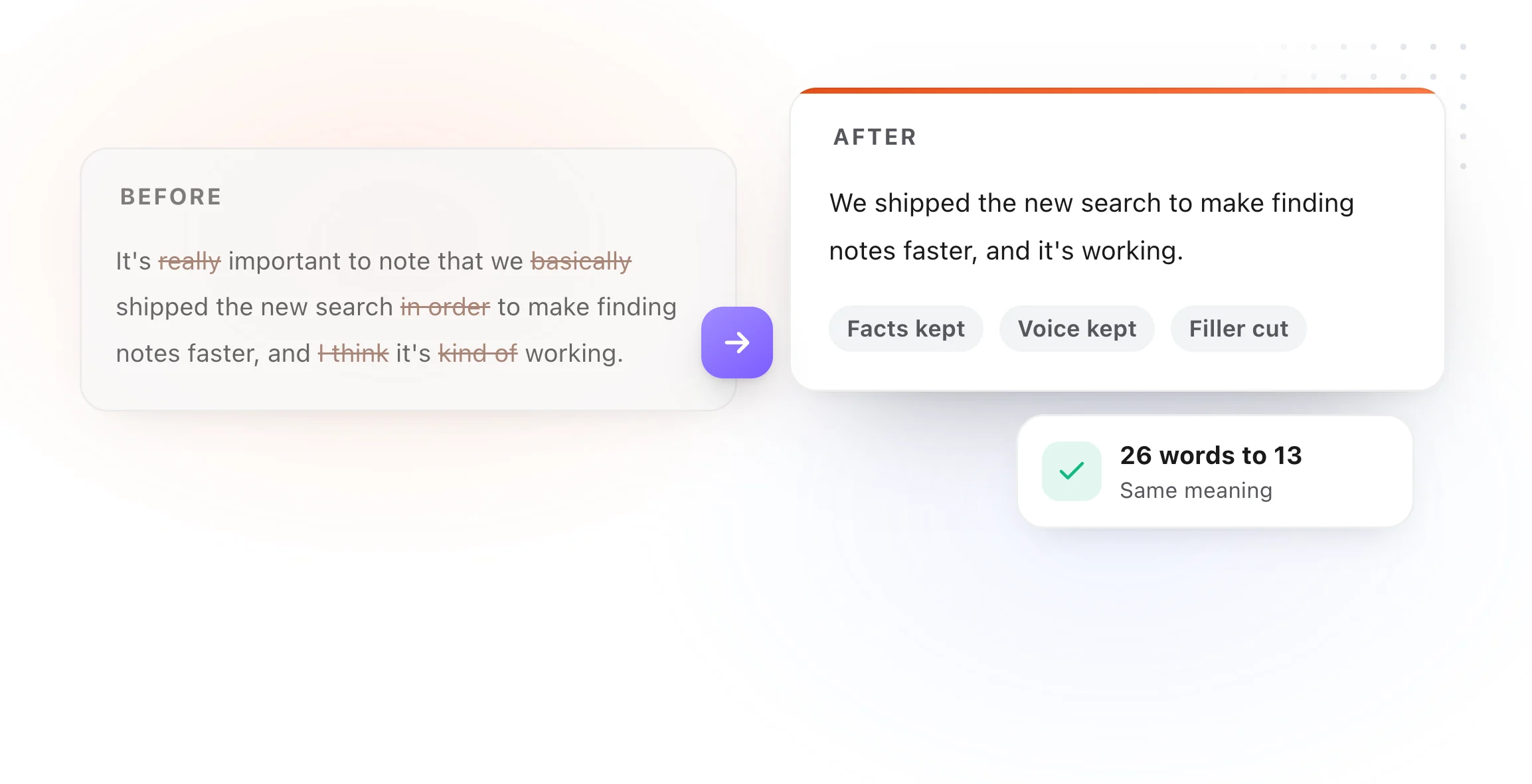
Remove filler and hedging from the text below: "just", "really", "I think", "kind of", "in order to", "it's important to note". Keep the meaning and my tone. Return only the edited text.

[paste text]
6. One idea per sentence
Split any sentence in the text below that carries more than one idea. Keep the wording as close to mine as possible. Vary sentence length so it doesn't read choppy.

[paste text]
Changing the tone
7. More confident
Rewrite the text below so it sounds confident and direct, without sounding arrogant. Replace soft phrases with clear statements. Keep the facts and length the same.

[paste text]
8. More friendly
Rewrite the text below so it sounds friendly and human, like a colleague talking. No exclamation points, no emoji, no flattery. Keep the facts and length the same.

[paste text]
9. More formal
Rewrite the text below in a formal, professional tone suitable for [audience]. No contractions, no slang, but keep it readable rather than stiff. Keep every fact.

[paste text]
10. Plain English
Rewrite the text below in plain English that a smart 14-year-old could follow. Replace jargon with everyday words, or explain a term the first time it's needed. Keep it accurate.

[paste text]
Restructuring
11. Put the point first
Reorder the text below so the main point or request comes in the first sentence, followed by the reasons, then the details. Keep my wording where you can.

[paste text]
12. Turn it into a list
Turn the text below into a short intro sentence followed by a bulleted list, one point per bullet, each under 15 words. Keep every point.

[paste text]
13. Turn a list into prose
Turn the bullet points below into two or three connected paragraphs that read naturally. Keep every point and their order unless a different order reads better.

[paste bullets]
14. Give it headings
Add short, plain headings to the text below so a reader can skim it. Don't change the body text. Suggest where a paragraph should be split if one runs long.

[paste text]
Finishing
15. Five titles
Write five titles for the text below. Each under 60 characters, specific to what it says, and not clickbait. Put the main topic early in each. Mark your favorite.

[paste text]
16. The opening line
Write three alternative opening sentences for the text below. Each should make a reader want the second sentence, without a question, a quote or a cliché.

[paste text]
17. The closing line
Write three ways to end the text below. Each should leave the reader with the one thing to remember or do, without "in conclusion" or a summary of everything.

[paste text]
18. A one-sentence summary
Summarize the text below in one sentence of no more than 25 words, the way the author would say it out loud.

[paste text]
Getting feedback
19. The honest reader
Read the text below as [audience]. Tell me where you got confused, where you stopped caring, and the one question you'd still have at the end. Don't rewrite anything.

[paste text]
20. Edit it in my style
Here are a few paragraphs I've written. Describe my style in five bullets: sentence length, word choice, tone, punctuation habits and how I open paragraphs. Then edit the text at the end for clarity, keeping to that style.

[paste samples]
---
[paste text to edit]
Keep them one keystroke away
Save the ones you use as snippets in TypeFire for free, and type a short abbreviation to drop a prompt into any chat window. With Pro, run them as Selection Prompts on highlighted text in any Mac app, on your own API key or on a model running on your Mac.
More prompt sets: AI prompts for email, AI prompts for summarizing, AI prompts for code review, and the full set in AI prompt examples.

Twenty prompts for editing your own writing, each one for a single job. Copy any of them into ChatGPT, Claude or Gemini with your text underneath, or save them in TypeFire and run them on a highlighted paragraph in any Mac app.
Ask a model to "improve this" and it hands back a new piece of writing that happens to cover the same topic. Your phrasing is gone, a few facts drift, and every sentence is now the same length. The fix is to treat it like an editor: name the one thing to change, and say what must stay. Every prompt below does both.
How to use these
In a chat window. Copy the prompt, paste your text under it, send.
On a selection. Save a prompt as a Selection Prompt, highlight a paragraph anywhere on your Mac, press the shortcut, and the edit replaces it. Good for one paragraph at a time, which is also how editing works best.
The prompts
Changing the tone · 7 · 8 · 9 · 10
Restructuring · 11 · 12 · 13 · 14
Correcting
1. Proofread and list every fix
Proofread the text below. Return a list of corrections only: the original phrase, the fix, and a three-word reason. Don't change style, word choice or structure, and don't rewrite the text.

[paste text]
2. Fix grammar and nothing else
Correct spelling, grammar and punctuation in the text below. Change nothing else: keep every word choice, sentence and line break that isn't an error. Use American English. Return only the corrected text.

[paste text]
3. Check the facts I should double-check
List every factual claim in the text below that a reader could check: numbers, dates, names, quotes and statements about other products. For each, say what to verify. Don't judge whether it's true.

[paste text]
Tightening
4. Cut it by a third
Shorten the text below by about a third. Keep every fact, request and example, and keep my voice. Cut repetition, warm-up sentences and words that add nothing. Return only the shorter text.

[paste text]
5. Remove filler and hedging
Remove filler and hedging from the text below: "just", "really", "I think", "kind of", "in order to", "it's important to note". Keep the meaning and my tone. Return only the edited text.

[paste text]
6. One idea per sentence
Split any sentence in the text below that carries more than one idea. Keep the wording as close to mine as possible. Vary sentence length so it doesn't read choppy.

[paste text]
Changing the tone
7. More confident
Rewrite the text below so it sounds confident and direct, without sounding arrogant. Replace soft phrases with clear statements. Keep the facts and length the same.

[paste text]
8. More friendly
Rewrite the text below so it sounds friendly and human, like a colleague talking. No exclamation points, no emoji, no flattery. Keep the facts and length the same.

[paste text]
9. More formal
Rewrite the text below in a formal, professional tone suitable for [audience]. No contractions, no slang, but keep it readable rather than stiff. Keep every fact.

[paste text]
10. Plain English
Rewrite the text below in plain English that a smart 14-year-old could follow. Replace jargon with everyday words, or explain a term the first time it's needed. Keep it accurate.

[paste text]
Restructuring
11. Put the point first
Reorder the text below so the main point or request comes in the first sentence, followed by the reasons, then the details. Keep my wording where you can.

[paste text]
12. Turn it into a list
Turn the text below into a short intro sentence followed by a bulleted list, one point per bullet, each under 15 words. Keep every point.

[paste text]
13. Turn a list into prose
Turn the bullet points below into two or three connected paragraphs that read naturally. Keep every point and their order unless a different order reads better.

[paste bullets]
14. Give it headings
Add short, plain headings to the text below so a reader can skim it. Don't change the body text. Suggest where a paragraph should be split if one runs long.

[paste text]
Finishing
15. Five titles
Write five titles for the text below. Each under 60 characters, specific to what it says, and not clickbait. Put the main topic early in each. Mark your favorite.

[paste text]
16. The opening line
Write three alternative opening sentences for the text below. Each should make a reader want the second sentence, without a question, a quote or a cliché.

[paste text]
17. The closing line
Write three ways to end the text below. Each should leave the reader with the one thing to remember or do, without "in conclusion" or a summary of everything.

[paste text]
18. A one-sentence summary
Summarize the text below in one sentence of no more than 25 words, the way the author would say it out loud.

[paste text]
Getting feedback
19. The honest reader
Read the text below as [audience]. Tell me where you got confused, where you stopped caring, and the one question you'd still have at the end. Don't rewrite anything.

[paste text]
20. Edit it in my style
Here are a few paragraphs I've written. Describe my style in five bullets: sentence length, word choice, tone, punctuation habits and how I open paragraphs. Then edit the text at the end for clarity, keeping to that style.

[paste samples]
---
[paste text to edit]
Keep them one keystroke away
Save the ones you use as snippets in TypeFire for free, and type a short abbreviation to drop a prompt into any chat window. With Pro, run them as Selection Prompts on highlighted text in any Mac app, on your own API key or on a model running on your Mac.
More prompt sets: AI prompts for email, AI prompts for summarizing, AI prompts for code review, and the full set in AI prompt examples.
Loved by people who type all day.
Unprompted reactions from users, in their own words.
Used by people at
Company names are places where our users work. They do not imply endorsement or affiliation.