Link Notes Inside a Mermaid Diagram, and See Them in Backlinks
A diagram in your notes usually ends at the picture. You draw the five phases of a project, and then you go hunting for the note about phase three anyway.
It doesn't have to work that way. If a box can be a link to a note, the diagram becomes a map you click through, and the notes it points to know they're on the map.
The short version
- In TypeFire for Mac, label a box with a note link like
[[Welcome email]]. Clicking it opens the note. - The link counts in that note’s backlinks and on the graph, like any link you type.
- In Obsidian, list the boxes in
class Biology,Chemistry internal-link;to make them clickable. - Best use: a project map, one box per part, each opening its note.
Why link from a diagram at all
A list of links tells you what exists. A diagram tells you how it fits together: what comes first, what depends on what, where a decision splits the work. Linking the boxes gives you both at once, and you stop keeping a separate index note that slowly goes out of date.
How it works in TypeFire
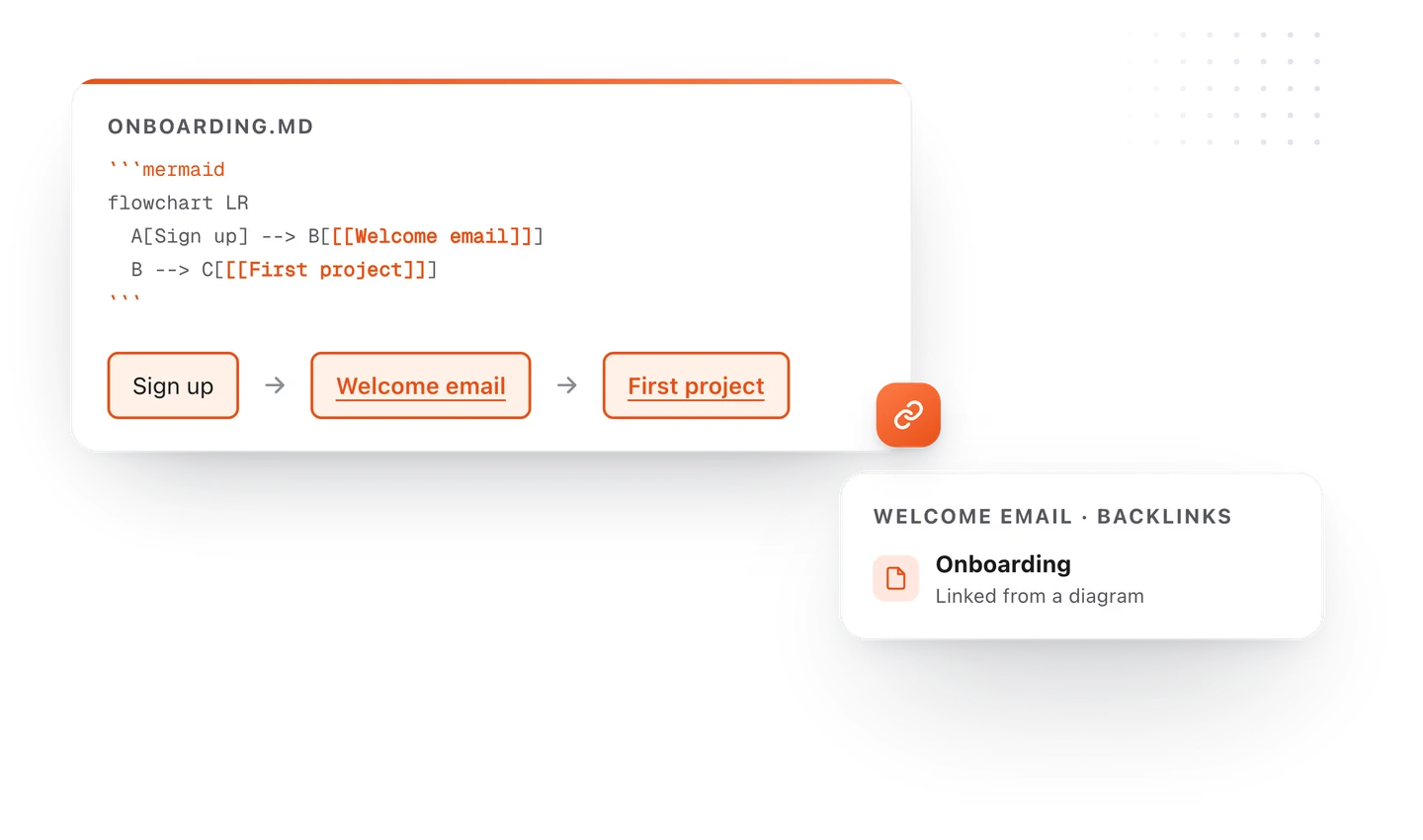
Write the note's name as a link in the box's label. Everything else is ordinary Mermaid.
flowchart LR
  A[Sign up] --> B["[[Welcome email]]"]
  B --> C["[[First project]]"]
  C --> D[Active user]
In the note, Welcome email and First project draw as linked boxes. Click one and that note opens. Open the Welcome email note and its backlinks list Onboarding, the note the diagram lives in, so you can always find your way back.
The links also show on the graph with the rest of your notes, so a project map pulls its notes together there too.
How it works in Obsidian
Obsidian makes a box clickable when you give it the internal-link class, and the box's text is the note it opens. Its help gives this example:
graph TD
  Biology --> Chemistry
  class Biology,Chemistry internal-link;
A project map you can click through
Here's the pattern worth stealing: one note per phase, and one diagram that links them.
| Box | Opens the note about |
|---|---|
| Welcome email | What the first email says and when it goes out |
| Reminder email | Who gets it and the wording |
| Setup guide | The steps a new user follows |
| First project | The template they start from |
When something changes, you edit one note and the map still points at it. When someone new joins, the map is the first thing you send them.
Tips
- Keep labels short. The box shows the note's name, so short names make a clean diagram.
- Link the parts, not every box. Decisions and endpoints read better as plain boxes.
- One map per project. A map of everything is a graph, and you already have one of those.
Try the syntax in the free Mermaid flowchart editor, and see diagrams in TypeFire for linking, zooming and resizing on the Mac. If your notes are in an Obsidian vault, TypeFire opens the same files.
Loved by people who type all day.
Unprompted reactions from users, in their own words.
Used by people at
Company names are places where our users work. They do not imply endorsement or affiliation.